

Website Compliance Audit: A 2026 Guide to ADA & WCAG Standards
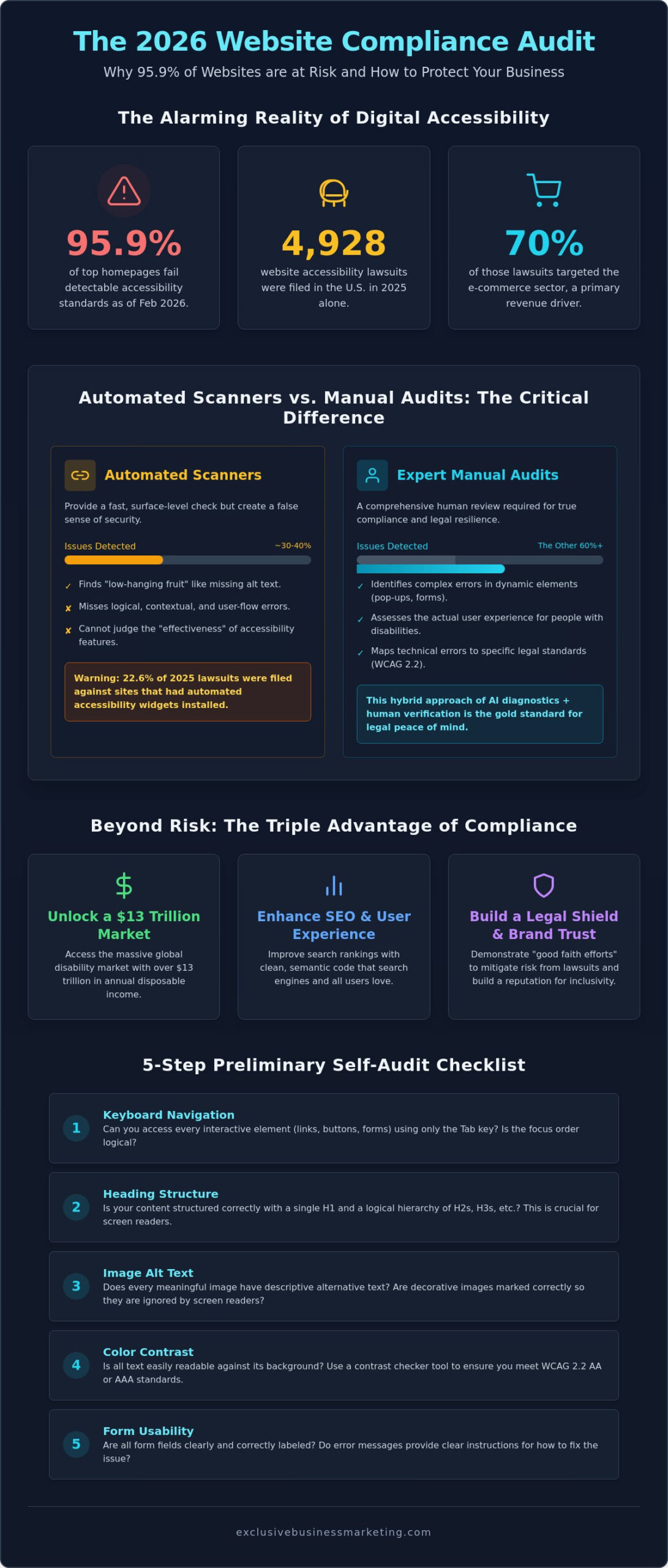
Did you know that as of February 2026, 95.9% of the top one million homepages still fail detectable accessibility standards? It is a staggering figure that proves most businesses are unknowingly exposed to significant legal risks. You likely feel the constant pressure of “drive-by” lawsuits, especially since nearly 5,000 website accessibility cases were filed in the U.S. just last year. It is exhausting to navigate the technical jargon of WCAG 2.2 while wondering if your automated tools are actually keeping you safe.
We understand that you need more than just a surface level scan; you need a definitive plan. This guide provides a comprehensive website compliance audit strategy designed for 2026 standards to help you identify hidden barriers before they turn into costly demand letters. We will show you how to move beyond basic overlays and implement a hybrid approach that combines AI diagnostics with expert human verification. By the end of this article, you’ll have a clear roadmap to secure a status report of your site, an actionable list of fixes, and the legal peace of mind your business deserves.
Key Takeaways
- Understand why adhering to WCAG 2.2 standards is essential for tapping into the $13 trillion global disability market while shielding your business from “drive-by” lawsuits.
- Discover why automated scanners miss roughly 40% of accessibility barriers and how manual testing identifies the logical flow issues software simply cannot see.
- Master a comprehensive website compliance audit strategy that maps every technical error directly to its corresponding legal standard for total peace of mind.
- Follow our five-step preliminary checklist to quickly identify and fix high-priority navigation and structural errors on your own.
- Learn how to navigate the specific digital accessibility laws affecting California businesses to ensure your site meets both state and federal requirements.
What is a Website Compliance Audit and Why is it Critical in 2026?
A website compliance audit is a diagnostic process that identifies digital barriers for users with disabilities. It functions as a comprehensive review of your site’s code and content against the Web Content Accessibility Guidelines (WCAG). In 2026, this procedure is no longer an optional “extra” for high-budget corporations. It’s a fundamental necessity for any business operating a digital storefront. By ensuring your site is fully accessible, you gain direct access to a global disability market with over $13 trillion in spending power. If your site isn’t compliant, you’re essentially locking your doors to a massive segment of loyal, high-value customers.
The stakes have never been higher. Data from 2025 revealed that 4,928 website accessibility lawsuits were filed in the U.S., with a staggering 70% of those targeting the e-commerce sector. Despite these risks, 95.9% of the top one million homepages still had detectable failures as of February 2026. Performing a website compliance audit allows you to get ahead of these statistics. It moves your business from a state of vulnerability to one of digital resilience and inclusivity.
The Legal Landscape: ADA and the Unruh Civil Rights Act
California is currently the epicenter of digital accessibility litigation. While the Americans with Disabilities Act (ADA) provides the federal framework, California’s Unruh Civil Rights Act makes the state a high-risk zone for businesses. The Unruh Act is particularly dangerous because it allows for statutory damages per violation; this makes settlements significantly more expensive than in other regions. In 2026, legal enforcement has moved firmly toward WCAG 2.2 standards. However, you can mitigate these risks. Courts often look favorably on businesses that demonstrate “good faith efforts.” By conducting a website compliance audit and maintaining an active remediation plan, you build a legal shield against predatory lawsuits that thrive on technical oversights.
SEO and Brand Benefits of an Accessible Site
Automated Scanners vs. Manual Testing: Knowing the Difference
Automated accessibility checkers are excellent for speed, but they often provide a false sense of security. These tools crawl your site’s HTML to identify “low-hanging fruit” errors like missing alt text or poor color contrast. While helpful, verified industry data confirms that automated scanners only detect roughly 30% to 40% of all potential accessibility barriers. This means a “green checkmark” on a free browser extension doesn’t mean you’re legally safe. In fact, 22.6% of lawsuits in early 2025 were filed against websites that had accessibility overlays or automated widgets installed. Relying solely on software for a website compliance audit leaves you exposed to the remaining 60% of errors that only a human eye can catch.
The official ADA web accessibility guidance emphasizes that businesses must provide effective communication and full access to their digital services. Software simply lacks the cognitive ability to judge the “effectiveness” of a site’s flow. It might tell you an image has alt text, but it won’t know if that text is a helpful description or just a string of irrelevant keywords meant to trick search engines. Real compliance requires a deeper look into how a human actually interacts with your interface.
Why Automated Checkers Only Find a Fraction of Errors
AI struggles with complex interactive elements. Custom chatbots, dynamic pop-ups, and multi-step forms often present logical hurdles that scanners completely ignore. Automated reports are also prone to false positives, flagging elements as broken when they actually function fine for assistive technology. This creates unnecessary noise and hides the real risks. Without a human to verify the context, you’re essentially guessing which fixes actually matter for your users.
The Essential Role of Human-Led Manual Audits
A true website compliance audit requires manual intervention from experts who understand user behavior. This includes keyboard-only navigation tests to ensure users can browse your site without a mouse. We also perform screen reader walkthroughs to hear exactly how a visually impaired visitor experiences your content. If your current site fails these tests, you may need a more comprehensive ada compliant website design to fix the underlying code. You can start this process today by requesting a free ADA compliance website checker report to see exactly where your site stands.
Essential Components of a Professional Website Accessibility Audit
A professional report goes far beyond a simple list of errors. It provides a technical blueprint that your developers can actually use to secure your digital presence. To be effective, a website compliance audit must include visual error highlighting. This means your team shouldn’t have to hunt through thousands of lines of code to find a single broken link. Instead, a high-quality audit pinpoints exactly where on the page a barrier exists. This level of precision is what separates a generic scan from a professional diagnostic tool. If you are researching how to audit your website for compliance, you will find that the most reliable reports prioritize multi-page domain scanning over single-page spot checks to ensure no sub-directory is left vulnerable.
We believe in transparency and action. Every website compliance audit we perform includes a prioritized remediation plan. This plan distinguishes between “critical” blockers that stop a user from completing a purchase and “advisory” fixes that improve the general user experience. By categorizing errors this way, you can allocate your budget effectively and address the highest legal risks first. It’s about working smarter to achieve measurable results quickly.
Mapping Errors to WCAG 2.2 Level AA Standards
Understanding the hierarchy of compliance is vital for your long-term strategy. WCAG standards are broken into three levels: A, AA, and AAA. Level A represents the absolute minimum requirements, while Level AA is the widely accepted legal standard for most commercial businesses. Level AAA is typically reserved for specialized government or educational platforms. When our team identifies a failure, we map it directly to a specific WCAG 2.2 Level AA success criterion. This detailed mapping provides the necessary documentation to show your orange county web design team exactly what needs to change to meet current enforcement guidelines.
Prioritizing Fixes Based on Risk and Impact
Not all errors carry the same weight in a courtroom or for a user. We focus on addressing “blocker” errors first. These are the critical failures in inaccessible checkout flows or contact forms that prevent a customer from giving you their business. We also help you balance brand aesthetics with high-contrast color requirements. You don’t have to sacrifice your visual identity for compliance. With the right roadmap, you can maintain a beautiful site while ensuring it remains fully accessible. This proactive approach builds a foundation for continuous monitoring, keeping you safe as standards evolve.
5 Steps to Perform a Preliminary Website Compliance Audit
You don’t need to be a senior developer to start securing your digital assets. While a professional review is eventually necessary, taking proactive steps on your own demonstrates a commitment to accessibility. This preliminary website compliance audit helps you spot obvious failures before they catch the attention of predatory legal firms. Follow these five steps to evaluate your site’s current state:
- Step 1: Run a baseline scan. Use a reputable accessibility checker to identify technical code errors that aren’t visible to the naked eye.
- Step 2: Perform a “Keyboard Only” test. Put your mouse aside and try to navigate your entire menu using only the “Tab” key. If you can’t reach every link, your site is effectively broken for many users.
- Step 3: Check color contrast for CTAs. Your Call-to-Action buttons must stand out. Ensure the text color and background color meet the 4.5:1 ratio required for standard text.
- Step 4: Audit image alt text. Every image should have a description that conveys its meaning. If an image is purely decorative, the alt attribute should be present but empty.
- Step 5: Review heading hierarchy. Your pages should follow a logical structure from H1 to H4. Skipping levels confuses screen readers and hurts your SEO.
Running Your Initial Baseline Scan
Start by selecting a tool that allows you to export your results as a PDF or CSV. This creates a timestamped record of your efforts. When you review the report, pay close attention to the distinction between “errors” and “warnings.” Errors are definitive failures that require immediate attention; warnings are potential issues that need a human to verify the context. Once you have this baseline, it’s easier to request an accurate quote from a local seo company near me to handle the more complex technical fixes.
Verifying Keyboard Navigation and Visual Contrast
The “Tab” test is the quickest way to find navigation blockers. As you move through the site, a clear “focus indicator” should outline the element you’ve selected. If that outline is missing, a keyboard user is essentially browsing in the dark. For contrast issues, use browser extensions that allow you to test ratios in real-time. We recommend documenting every DIY finding in a central log. This documentation serves as a “good faith” effort, showing that your business is actively working toward compliance if you’re ever questioned. It’s a simple way to build a layer of legal protection while you prepare for a more formal website compliance audit.
Ready to see where your site stands right now? Get your free ADA compliance website checker report today and identify your most critical risks in seconds.
Beyond the Checker: Securing Professional ADA Compliance in California
Think of an automated software scan as your site’s smoke detector. It’s a vital early warning system that alerts you when something is wrong, but it’s not equipped to put out the fire. A professional website compliance audit functions as the fire department. It provides the heavy-duty technical intervention required to extinguish legal risks and structural code failures that software simply cannot reach. In the high-stakes California market, knowing a problem exists is only the first step. You need a partner who can remediate those issues while ensuring your site remains fast, beautiful, and functional.
At Exclusive Business Marketing, we specialize in merging high-performance orange county seo with strict accessibility standards. This dual approach ensures your site ranks at the top of search results while staying open to every potential customer. Digital accessibility isn’t a “one-and-done” project; it’s a continuous commitment to your audience. As you upload new content, launch products, or update your theme, your compliance status can shift. We provide the ongoing monitoring necessary to keep your digital presence secure and inclusive as your business grows.
Why Orange County Businesses Need Local Compliance Expertise
Operating a business in Southern California brings unique legal challenges that agencies in other states might overlook. Our Huntington Beach team understands the aggressive nature of local digital accessibility litigation. We’ve seen local businesses successfully avoid the crushing weight of Unruh Act settlements by taking a proactive stance before a demand letter ever arrives. By choosing a local partner, you gain an ally who knows the specific legal climate of the Orange County courts. We don’t just fix code; we help you build a more resilient brand. This strategy combines mandatory compliance with high-conversion web design, ensuring you see a tangible ROI on every accessibility improvement.
Get Your Custom Accessibility Roadmap
There is a massive difference between a generic scan and our expert-led audit reports. While a checker might flag a missing label, our experts look at the entire user journey to ensure your site is truly navigable for everyone. We dive deep into your site’s architecture to fix code-level barriers without breaking your brand’s visual identity. You don’t have to sacrifice your aesthetic for the sake of a website compliance audit. Our team handles the complex technical tasks so you can focus on your day-to-day operations. We transform audit findings into a clear, actionable roadmap that secures your business and welcomes all users.
Don’t leave your business exposed to unnecessary legal risks. Claim your Free ADA Compliance Website Checker Report today! and let our experts guide you toward total digital peace of mind.
Take Command of Your Website’s Accessibility and Growth
Digital standards in 2026 demand more than just surface-level fixes. You’ve learned that while automated tools provide a helpful baseline, they can’t replace the nuanced insight of a manual expert review. By aligning your site with WCAG 2.2 standards, you’re securing your brand against predatory lawsuits and opening your doors to a massive, underserved global audience. A comprehensive website compliance audit is your first line of defense and your best tool for sustainable growth.
We specialize in expert ADA compliant website design and provide Huntington Beach local support for businesses that want tangible results. Our team bridges the gap between technical compliance and comprehensive SEO to ensure your site performs at its peak. We handle the complex technical tasks so you can focus on running your business with total peace of mind. Don’t let hidden barriers hold your brand back or expose you to unnecessary legal risk.
Get Your Free ADA Compliance Website Checker Report Now
It’s time to turn your compliance requirements into a powerful competitive advantage. We’re ready to help you build a more inclusive and successful digital future today.
Frequently Asked Questions
Is a free website accessibility checker enough for legal compliance?
No, a free checker is not enough to guarantee legal compliance. These tools serve as a vital “smoke detector” to find high-level code errors, but they miss roughly 60% of barriers that require human judgment. You need a manual website compliance audit to identify logical flow issues and navigation hurdles that software simply cannot detect.
How often should I perform a website compliance audit?
You should perform a comprehensive website compliance audit at least once per year. If you frequently update your content or add new features, quarterly reviews are much safer. Accessibility is a moving target; a single plugin update or new blog post can instantly break your site’s compliance and expose you to risk.
Can my business be sued if I use an accessibility widget or overlay?
Yes, your business can still be sued if you rely solely on an accessibility widget or overlay. Research from 2025 showed that 22.6% of lawsuits targeted websites that had these overlays installed. These tools often interfere with screen readers and don’t fix the underlying source code, which is what courts actually require for true ADA compliance.
What are the most common errors found during an ADA audit?
The most common errors include low-contrast text, missing alt text, and empty links or buttons. Data from February 2026 indicates that low contrast affects 83.9% of homepages, while missing alt text remains a barrier on 53.1% of sites. These “silent” errors are exactly what professional auditors hunt for to protect your brand from litigation.
Does ADA compliance apply to small businesses in California?
Yes, ADA compliance applies to every business in California regardless of its size. The Unruh Civil Rights Act does not provide exemptions for small businesses or startups. If you operate a website that is accessible to the public, you’re legally required to ensure it is usable by people with disabilities to avoid costly statutory damages.
How does a compliance audit improve my SEO rankings?
What is the difference between WCAG 2.1 and WCAG 2.2 in 2026?
WCAG 2.2 is the most current version of the guidelines and adds nine new criteria specifically for mobile and cognitive accessibility. While the U.S. Department of Justice has historically referenced WCAG 2.1 Level AA in its rules for certain entities, moving to 2.2 ensures you stay ahead of evolving legal expectations. It’s the safest way to future-proof your digital presence.
How long does a professional website compliance audit typically take?
A professional audit typically takes between one and three weeks to complete. The timeline depends on the number of unique page templates and the complexity of your site’s interactive elements. This timeframe includes both the automated scanning phase and the deep-dive manual testing required to produce an actionable remediation roadmap for your developers.