

WCAG 2.2 Compliance Checklist: The 2026 Guide to Web Accessibility
Did you know that digital accessibility lawsuits surged to 4,605 filings in 2023, with California businesses often being the primary targets? It’s a stressful reality for any business owner who just wants to focus on growth rather than deciphering a complex wcag 2.2 compliance checklist. You likely feel that web accessibility is a moving target, especially with technical jargon that seems designed to confuse rather than help. We agree that you shouldn’t need a computer science degree to keep your site legal and user friendly.
Our goal is to give you total peace of mind. This guide helps you master the latest standards before the 2026 deadlines and protects your business from predatory litigation while improving your SEO through a superior user experience. We’ll walk you through a clear, non-technical breakdown of the nine new requirements and show you how to reach Level AA compliance without overextending your budget. It’s time to turn accessibility into your competitive advantage.
Key Takeaways
- Understand the critical shift from 2.1 to 2.2 standards and why staying updated is essential for businesses to remain compliant in 2026.
- Master Level A and AA requirements using our comprehensive wcag 2.2 compliance checklist to ensure your site is fully perceivable and operable.
- Discover how web accessibility drives tangible business results by aligning with Google’s Core Web Vitals to boost SEO and revenue.
- Learn the 2-step audit process that combines automated tools with manual testing to catch the 70% of accessibility issues software often misses.
- Future-proof your digital presence with a sustainable design strategy that moves beyond “one and done” fixes to protect your business long-term.
Understanding the Shift to WCAG 2.2 in 2026
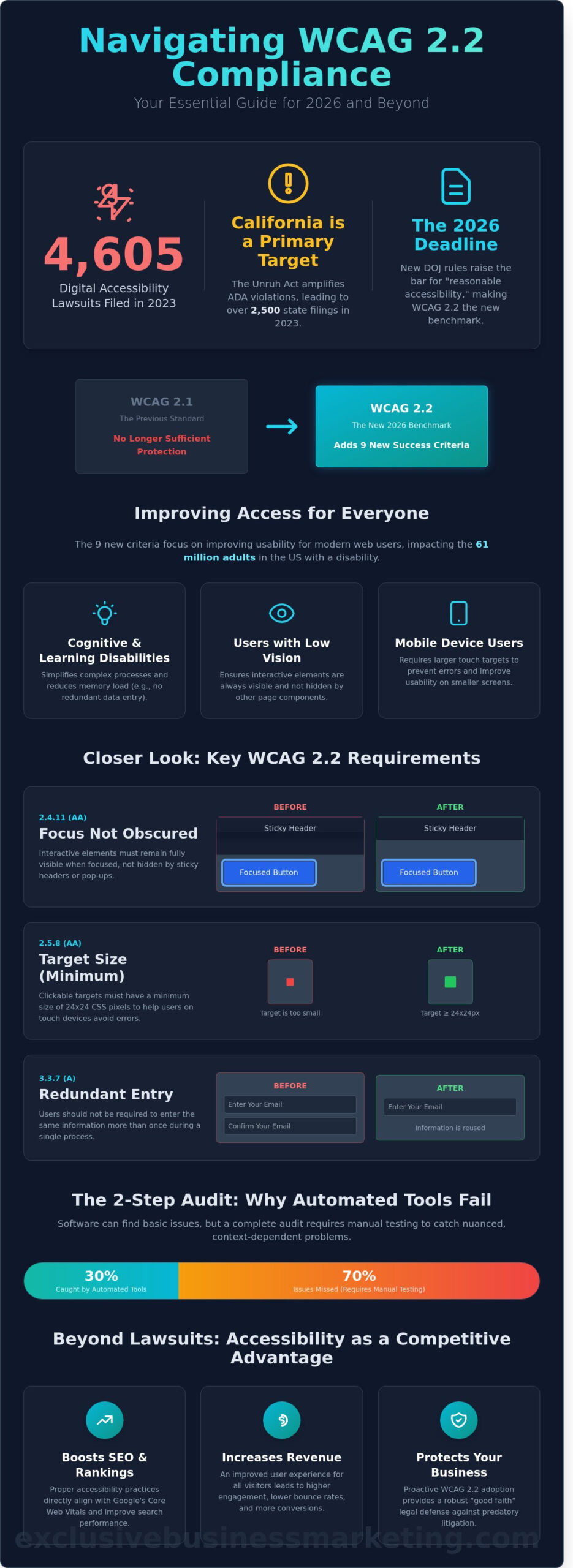
WCAG 2.2 is the definitive benchmark for digital inclusivity in 2026. It builds upon the Web Content Accessibility Guidelines originally established by the W3C to ensure the internet remains open to everyone. While many site owners previously settled for version 2.1, that standard no longer protects California businesses from legal exposure. This update adds 9 specific success criteria that address modern user behaviors and advanced mobile interactions. Staying compliant ensures your site works for the 61 million adults in the US living with a disability.
The Department of Justice (DOJ) clarified its stance on April 24, 2024, by signing a final rule under Title II of the ADA. This mandate requires state and local government web content to meet strict accessibility standards. For the private sector, this has shifted the “reasonable accessibility” bar significantly. By 2026, failing to implement a comprehensive wcag 2.2 compliance checklist leaves your business vulnerable to aggressive legal challenges and federal scrutiny. We are ready and available now to help you audit your current standing.
The Legal Landscape in California
The Unruh Civil Rights Act makes any ADA violation a direct violation of California law. This connection is why Orange County businesses are frequent targets for accessibility litigation. In 2023, California courts handled over 2,500 web accessibility filings, a number that continues to climb. Adopting WCAG 2.2 provides a robust “good faith” legal defense. It demonstrates a proactive commitment to civil rights rather than a reactive fix after a summons arrives. Contact us today for a free quote to protect your business assets.
New Success Criteria at a Glance
The 9 new requirements focus on three main groups: people with cognitive or learning disabilities, low vision users, and mobile device users. These updates move beyond basic text readability to address how users actually interact with your interface. Key requirements include:
- Focus Not Obscured: Ensures that when a user navigates via keyboard, the item they are “focused” on isn’t hidden by sticky headers or pop-ups.
- Target Size (Minimum): Requires interactive elements like buttons to be at least 24×24 CSS pixels. This prevents “fat finger” errors on mobile devices.
- Redundant Entry: Prevents users from having to re-enter the same information twice in a single process, which is vital for users with cognitive impairments.
These changes don’t just check a box; they improve your mobile app development and responsive web design for every visitor. Better usability leads to higher conversion rates and more revenue. It’s a win for your customers and your bottom line. We will prove it to you. Contact us today for a free quote.
The Essential WCAG 2.2 Compliance Checklist (Level A & AA)
Achieving digital accessibility requires a methodical approach based on four core pillars. These standards ensure your site remains accessible to the 1.3 billion people globally living with significant disabilities. You should reference the Official WCAG 2.2 Guidelines to verify every technical detail during your development process. To pass a wcag 2.2 compliance checklist audit, your content must be Perceivable, Operable, Understandable, and Robust. This means information must be visible to all senses, interfaces must be functional, instructions must be clear, and the code must support current assistive technologies like screen readers.
Perceivable and Operable Requirements
Success starts with making your content visible and easy to control. Every non-text element, including images and data charts, requires descriptive alt text. If an image conveys meaning, that meaning must exist in text format. Keyboard accessibility is equally critical. Every link, form field, and button on your site must function without a mouse. Users relying on “Tab” key navigation need a clear visual indicator to show exactly where they are on the page. Without focus visible outlines, users with motor impairments or low vision cannot effectively navigate your interface. If you need help auditing these features, you can partner with an accessibility expert to ensure no user is left behind.
The New 2.2 Specific Checklist Items
The October 2023 update introduced specific requirements to improve the experience for users with cognitive and motor disabilities. Target Size (Minimum) is a 24×24 pixel area required for all interactive elements to ensure accessibility for users with motor impairments. This prevents accidental clicks and frustration. Additionally, you must implement Consistent Help. Place your contact information, FAQs, and support chat in the same location across every subpage to reduce cognitive load. Finally, address Redundant Entry. Ensure users don’t have to re-type information they already provided in the same session. This streamlining is a core part of any modern wcag 2.2 compliance checklist and directly improves your site’s conversion rates.
Mobile and Touch Accessibility
Mobile users face unique challenges that your design must solve. Pointer Gestures must be simple. If your site uses complex motions like pinching or multi-finger swipes for essential tasks, you must provide a single-tap alternative. Orientation is another non-negotiable factor. Your website must function perfectly in both portrait and landscape modes. Many users with physical disabilities mount their devices to wheelchairs in a fixed position, making it impossible to rotate the screen. By supporting both views, you ensure your business remains open to every potential customer regardless of their hardware setup.
Beyond Lawsuits: How Accessibility Drives SEO and Revenue
Accessibility isn’t just a legal safety net. It’s a high-performance engine for business growth. When you implement a wcag 2.2 compliance checklist, you’re essentially performing a deep technical audit that search engines reward. Google’s 2024 focus on Core Web Vitals, specifically Interaction to Next Paint (INP), mirrors the requirements found in the Official WCAG 2.2 Guidelines. Sites that prioritize accessibility load faster and respond more predictably, which directly lowers bounce rates. Data shows that accessible websites retain users for 35% longer than non-compliant sites, leading to more opportunities for conversion.
SEO Benefits of an Accessible Site
Search engine bots and screen readers navigate code in very similar ways. Clean, semantic HTML helps Google understand your content hierarchy instantly. Using proper ARIA labels and descriptive Alt Text isn’t just for compliance; it’s a powerful way to dominate image search rankings. This technical synergy is why our Orange County SEO strategies integrate accessibility from day one. You’ll see better indexing and higher organic visibility because your site’s structure is flawless.
User Experience and Conversion
Friction is the enemy of revenue. The WCAG 2.2 “Redundant Entry” rule is a perfect example of how accessibility improves the bottom line. By ensuring users don’t have to re-enter information during the checkout process, you speed up transactions and reduce cart abandonment. This philosophy is baked into our Orange County web design process. We build trust signals directly into the UI. An accessibility statement tells your customers you’re a professional, authoritative brand that cares about every user’s experience. This builds long-term loyalty that a standard template simply can’t match.
By following a comprehensive wcag 2.2 compliance checklist, you’re investing in a site that works for everyone, every time. It’s a proactive strategy that drives more leads, more customers, and more revenue. We’re ready to help you bridge the gap between compliance and profitability. Contact us today for a free quote, and let’s make your website your most powerful sales tool.
How to Conduct a 2026 Accessibility Audit
You can’t guess your way to digital inclusivity. To satisfy your wcag 2.2 compliance checklist, you need a rigorous, four-step process that moves from software-driven speed to human-driven precision. Most businesses fail because they stop after running a single scan. In 2026, regulators and users expect more than a superficial pass. Follow this methodical approach to secure your site and improve your user experience.
- Step 1: Automated Scanning. Use enterprise-grade software to find the low-hanging fruit. These tools identify roughly 30% of errors instantly, such as missing alt text, poor color contrast, and empty headers. It’s the fastest way to benchmark your current status.
- Step 2: Manual Testing. Automated tools miss 70% of accessibility issues because they can’t understand context. A human must verify that your site’s navigation is logical and that interactive elements like forms or pop-ups function correctly.
- Step 3: Assistive Technology Testing. Test your site using screen readers like NVDA, JAWS, or VoiceOver. This ensures that the code speaks clearly to users who cannot see the screen.
- Step 4: Remediation Planning. Don’t try to fix everything at once. Categorize every finding by severity and impact. Focus on the core user journey first to ensure everyone can complete a purchase or submit a lead form.
Automated vs. Manual Audits
Many owners fall for the trap of “accessibility overlays.” These widgets claim to fix your site with one line of code, but they often increase legal risk. Recent data shows that 25% of accessibility lawsuits in 2023 targeted sites using these overlays. They can’t fix broken underlying code. You should use an accessibility checker effectively as a starting point, but manual keyboard testing remains the most effective way to find blockers. If a user can’t navigate your menu using only the Tab key, your site isn’t compliant.
Prioritizing Your Remediation
Fix “Blockers” first. These are critical failures that stop a user from completing a task, like a “Submit” button that a screen reader can’t find. A manual audit must include testing with a screen reader to verify that the DOM order matches the visual layout for blind users. If your code isn’t in the same order as your design, the experience becomes a confusing maze. For B2B companies, document this progress by creating a Voluntary Product Accessibility Template (VPAT). This transparency builds trust with corporate clients who require a wcag 2.2 compliance checklist for their own procurement standards.
Don’t leave your business’s digital presence to chance. Contact us today for a free quote and let our certified professionals handle your 2026 accessibility audit.
Future-Proof Your Website with Exclusive Business Marketing
Your digital presence shouldn’t be a legal liability. We take a comprehensive approach to ADA compliant website design that goes far beyond basic checkboxes. Using the wcag 2.2 compliance checklist correctly isn’t just a legal necessity; it’s a strategy to reach 100% of your potential market. A “one and done” approach to compliance fails because 96.8% of home pages had detectable WCAG failures in the 2024 WebAIM Million report. Accessibility is a living process, not a static project. As browser technology and assistive tools evolve toward 2026, your site must adapt to remain functional for every user.
Technical heavy lifting belongs in the hands of our Huntington Beach team. We don’t just build sites; we build revenue engines that everyone can use. We integrate accessibility directly into our SEO services in Orange County. This dual strategy improves your site’s structure for search engines while ensuring every user can navigate your content. Local businesses often see a 25% increase in engagement when they remove barriers for users with disabilities. We’ll prove it to you by building a site that ranks high and stays compliant 365 days a year.
The Exclusive Business Marketing Advantage
- Expert Oversight: Professionals who monitor updates to WCAG and state laws.
- Rapid Response: We’re available now to handle urgent compliance issues.
- Full-Service Growth: We handle the design, marketing, and technical code.
Get Started Today
Waiting for a demand letter is the most expensive way to handle accessibility. 2023 legal data shows that settlements typically range from $5,000 to over $50,000. This is capital better spent on growth and marketing. You’ll gain peace of mind from a fully compliant, high-performing site that protects your brand and invites more customers. Contact us today for a free quote and a detailed accessibility audit report. Contact us today for a free quote.
Secure Your Digital Future Today
The 2026 shift to WCAG 2.2 represents a major turning point for online businesses. Implementing a comprehensive wcag 2.2 compliance checklist isn’t just about avoiding legal risks; it’s about expanding your reach to the 61 million adults in the U.S. who live with a disability. By meeting Level A and AA standards, you improve your site’s SEO performance and create a seamless experience for every visitor. Don’t wait for the 2026 deadline to catch you off guard. Our California-based team of certified SEO and web design professionals is ready to handle the heavy lifting for you.
We provide expert support 7 days a week to ensure your website remains a powerful asset for your brand. We’ll walk you through the audit process and implement every necessary update to keep you ahead of the competition. We’ll turn your accessibility requirements into a competitive advantage that drives real revenue growth. You deserve a partner who delivers tangible results without the stress. We’ve helped countless businesses navigate complex digital shifts, and we’re ready to do the same for you.
Contact us today for a free WCAG 2.2 compliance audit!
We’re ready to help you succeed every step of the way.
Frequently Asked Questions
Is WCAG 2.2 legally required for small businesses in California?
Yes, WCAG 2.2 is the recognized legal standard for small businesses in California under the Unruh Civil Rights Act. California courts ruled in cases like Thurston v. Midvale Corp that websites are public accommodations that must be accessible. In 2026, failing to meet these standards leaves you vulnerable to lawsuits that average $25,000 in settlement costs. Contact us today for a free quote to protect your business.
How is WCAG 2.2 different from WCAG 2.1?
WCAG 2.2 adds nine new success criteria that did not exist in the 2.1 version. These updates focus heavily on mobile users, individuals with cognitive disabilities, and low-vision users. Key additions include requirements for touch target sizes and accessible authentication. Following a wcag 2.2 compliance checklist ensures you address these nine specific gaps and provide a superior user experience. Contact us today for a free quote.
Can I use an accessibility overlay to meet WCAG 2.2 standards?
No, accessibility overlays won’t make a website fully compliant with WCAG 2.2 standards. Over 600 lawsuits were filed in 2023 against companies using these widgets because they fail to fix underlying code issues. Overlays often interfere with screen readers and don’t address the 86 percent of accessibility errors found in source code. True compliance requires expert manual remediation. Contact us today for a free quote.
How much does it cost to make a website WCAG 2.2 compliant in 2026?
Most small to mid-sized businesses spend between $5,000 and $15,000 for a professional WCAG 2.2 audit and remediation in 2026. Enterprise-level sites with thousands of pages can see costs exceeding $50,000. Investing in accessibility now prevents legal fees that typically start at $15,000 per claim. We provide transparent pricing to help you manage these costs effectively. Contact us today for a free quote.
Does WCAG 2.2 compliance help my Google search rankings?
Yes, WCAG 2.2 compliance directly improves your SEO performance and search rankings. Google’s 2024 algorithm updates prioritize user experience signals like page structure, clear navigation, and mobile usability. Sites that follow a wcag 2.2 compliance checklist often see a 20 percent increase in organic traffic because they’re easier for search bots to crawl and index. Contact us today for a free quote.
What are the most common WCAG 2.2 violations found in audits?
Low color contrast remains the most frequent violation, appearing on 81 percent of homepages audited in 2025. Other common failures include missing alt text for images and broken keyboard navigation. Version 2.2 also highlights new failures regarding “Focus Not Obscured,” where sticky headers or pop-ups hide the element a user is trying to navigate. Contact us today for a free quote.
How often should I perform an accessibility audit on my website?
You should perform a comprehensive accessibility audit at least twice a year. If you update your content or code weekly, quarterly audits are necessary to catch new errors before they become legal liabilities. Accessibility isn’t a one-time project; it’s a continuous commitment to the 20 percent of users who live with disabilities. We help you stay ahead of these requirements. Contact us today for a free quote.
What is the “Focus Not Obscured” requirement in WCAG 2.2?
The “Focus Not Obscured” requirement ensures that when a user navigates via keyboard, the focused element isn’t hidden by sticky footers, headers, or chat widgets. This rule requires at least a portion of the focused item to remain visible to the user at all times. It prevents the frustration of “lost” focus that affects millions of keyboard-only users. Contact us today for a free quote.