

How to Make a Website ADA Compliant: The Definitive 2026 Business Guide
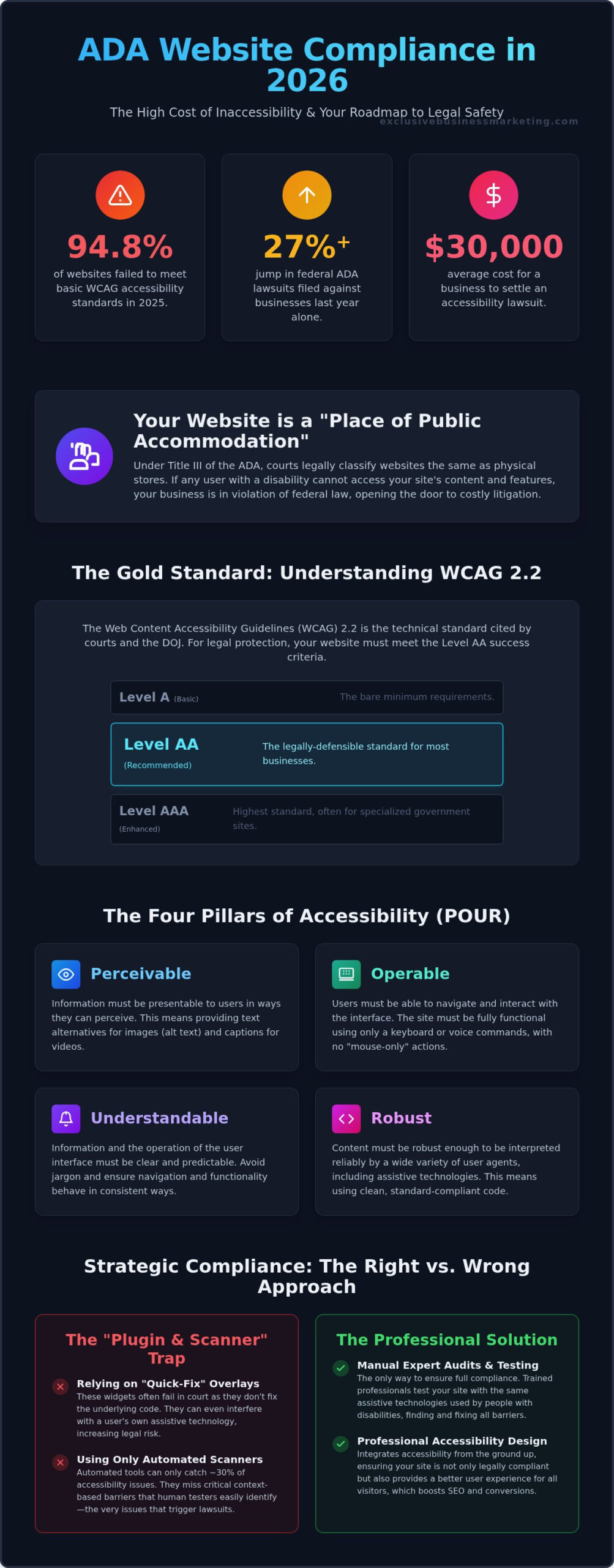
Did you know that 94.8% of websites failed to meet basic WCAG accessibility standards in 2025? This staggering figure explains why predatory lawsuits are surging, with federal filings jumping 27% last year alone. If you’re wondering how to make a website ada compliant without sacrificing your brand’s aesthetic, you aren’t alone.
It’s frustrating to feel caught between complex WCAG 2.2 technicalities and the fear of a $30,000 legal settlement. You want a site that looks great and works for everyone, but the rules often feel like a moving target. We understand that your business needs a solution that is both legally sound and visually stunning. You shouldn’t have to choose between a beautiful design and legal safety.
This guide provides the clarity you need. You’ll learn the exact steps to bring your digital presence into compliance, shielding your business from litigation while boosting your search engine rankings. We’re breaking down the shift from WCAG 2.1 to 2.2, exposing why simple overlay widgets fail in court, and providing a clear roadmap to a more inclusive, high-performing website.
Key Takeaways
- Understand why websites are legally classified as “places of public accommodation” and how Title III of the ADA impacts your 2026 digital presence.
- Discover the critical updates in WCAG 2.2 and why moving beyond older standards is essential for future-proofing your business against litigation.
- Access a comprehensive checklist that shows you exactly how to make a website ada compliant by addressing the most common triggers for predatory lawsuits.
- Learn why manual expert testing is the only way to ensure full compliance, as automated scanners often miss critical barriers that lead to legal trouble.
- Find out how professional accessibility design improves your user experience and search engine rankings while helping you avoid the “plugin trap” that increases legal risk.
Why ADA Compliance is Mandatory for Websites in 2026
In 2026, the legal view of the internet has fundamentally shifted. Courts now strictly define websites as “places of public accommodation” under Title III of the Americans with Disabilities Act (ADA). This means your digital storefront is legally identical to a physical office or retail shop. If a person with a disability can’t navigate your site, you’re technically in violation of federal law. Understanding how to make a website ada compliant is the first step in defending your business from this growing legal risk.
The financial reality of 2026 is sobering. Federal lawsuits under Title III increased by 27% last year, and total filings exceeded 5,000. Settling a filed lawsuit now costs an average of $30,000, while even a pre-litigation demand letter can drain $5,000 to $25,000 from your budget. Predatory legal firms are no longer just chasing “big fish” corporations. They now focus on small businesses, banking on the fact that many haven’t yet implemented professional accessibility standards. These “drive-by” lawsuits often target e-commerce sites, which account for nearly 77% of all digital accessibility claims. If you’re researching how to make a website ada compliant, you’re already ahead of the curve, but waiting until you receive a letter is a mistake that could cost you your business.
The California Factor: Understanding the Unruh Civil Rights Act
California is the epicenter of accessibility litigation. Under the Unruh Civil Rights Act, plaintiffs don’t just win a fix for the site; they can claim statutory damages for every violation. This creates a high-stakes environment where a few coding errors can lead to massive payouts. By prioritizing ADA compliant website design, you protect your business from these state-specific penalties while showing your local customers that you value inclusivity. It’s a proactive move that safeguards your reputation in a litigious market like Orange County. Our team sees these cases daily, and we know that a compliant site is your best defense against predatory legal strategies.
DOJ Enforcement Trends: What to Expect This Year
The Department of Justice has intensified its focus on digital equity. They’ve shifted enforcement toward the Web Content Accessibility Guidelines (WCAG) 2.2, which includes more rigorous requirements for mobile accessibility and cognitive barriers. This means that “good enough” is no longer a defense in 2026. The DOJ views digital accessibility as a fundamental civil right and expects businesses to eliminate all web-based barriers that prevent people with disabilities from accessing the same services as everyone else.
Understanding WCAG 2.2: The Roadmap for Digital Accessibility
The Web Content Accessibility Guidelines, or WCAG, serve as the technical blueprint for digital inclusion. While the ADA provides the legal framework, WCAG tells you exactly how to make a website ada compliant from a coding perspective. The latest version, WCAG 2.2, became an official W3C Recommendation on October 5, 2023. It was later adopted as ISO/IEC 40500:2025 on October 21, 2025. For business owners, this isn’t just technical jargon. It’s the roadmap to avoiding lawsuits and reaching a wider audience.
Compliance is categorized into three levels. Level A is the bare minimum, covering essential barriers. Level AAA is the highest “gold standard” usually reserved for specialized educational or government sites. Level AA is the sweet spot. It’s the standard most frequently cited by U.S. courts and the one you should target for total legal safety. Moving from 2.1 to 2.2 isn’t about starting over. It’s about refining the user experience. The 2.2 update specifically addresses gaps in mobile navigation and provides better support for users with cognitive or motor disabilities.
The Four Pillars of Accessibility (POUR)
To understand the technicalities, look at the four guiding principles of the ADA Guidance on Web Accessibility. These ensure your site is functional for everyone:
- Perceivable: Information cannot be invisible to any of the senses. This includes providing text alternatives for images and captions for videos.
- Operable: Users must be able to navigate your site using only a keyboard or voice commands. If a mouse is required, your site is broken for many users.
- Understandable: Content should be clear. Navigation must be predictable. Don’t confuse your visitors with erratic layouts or complex jargon.
- Robust: Your site must remain compatible with various browsers and assistive technologies like screen readers as they evolve.
New Success Criteria in WCAG 2.2 You Need to Know
The 2.2 update introduced nine new success criteria. Three are particularly critical for modern business sites. Focus Not Obscured ensures that when a user tabs through your site, the “focus” indicator isn’t hidden by sticky headers or pop-ups. Target Size requires buttons and links to be large enough for people with mobility issues to click accurately. Finally, Redundant Entry prevents frustration by ensuring users don’t have to re-enter the same information twice during a single session. Mastering these details is how you truly learn how to make a website ada compliant. If this feels overwhelming, our experts in WCAG & ADA Compliant Website Design can handle the heavy lifting for you.
The Essential ADA Compliance Checklist for Modern Websites
Learning how to make a website ada compliant starts with identifying the low-hanging fruit that predatory law firms use to build their cases. Most lawsuits aren’t triggered by complex backend errors. They’re sparked by obvious visual or structural gaps that any automated scanner can find in seconds. By following a rigorous checklist based on the Official WCAG Standards, you can close these gaps before they become legal liabilities. You don’t need to rebuild your site from scratch to see immediate improvements in accessibility and user experience.
Use this 10-point checklist to audit your site’s current status:
- Descriptive alt text for all meaningful images.
- High-contrast color ratios (at least 4.5:1 for standard text).
- Logical heading hierarchy (H1 through H6) for structural clarity.
- Full keyboard-only navigation functionality.
- Descriptive link text that makes sense out of context.
- Captions and text transcripts for all video content.
- Properly labeled form fields with clear error instructions.
- No auto-playing audio or video that disrupts screen readers.
- Text that remains readable when resized up to 200%.
- A dedicated, public Accessibility Statement linked in your footer.
Visual and Content Accessibility Requirements
Content is the heart of your site, but it must be readable by everyone. To satisfy a 2026 AI crawler, your alt text must provide a concise yet vivid description that captures the image’s context and intent, such as “Professional designer reviewing a WCAG 2.2 compliant mobile interface on a tablet.” Beyond images, ensure your color contrast is sharp. Light gray text on a white background might look sleek, but it’s a major barrier for users with low vision. Use proper heading tags to create a roadmap for screen readers. This helps users understand the relationship between different content sections without needing to see the layout.
Technical and Interactive Accessibility
Interactive elements are where many businesses fail. Can a user browse your entire site using only the “Tab” key? If they get stuck in a “keyboard trap” on a menu or form, your site isn’t compliant. Forms must have clear labels so users know exactly what data is required. When an error occurs, the site should tell the user what went wrong and how to fix it, rather than just highlighting a box in red. For multimedia, captions aren’t optional. They’re a requirement for ensuring your message reaches users who are deaf or hard of hearing.
Achieving high-end Orange County web design while staying compliant is about smart architecture, not limiting your creativity. You shouldn’t have to sacrifice style for safety. A professional approach integrates these requirements into the design phase, resulting in a site that is both beautiful and inclusive. Finally, don’t forget your Accessibility Statement. This document acts as a public declaration of your commitment to inclusion. It tells visitors and legal entities that you’re actively working on how to make a website ada compliant and provides a way for users to report any barriers they encounter.
How to Audit and Test Your Site for Accessibility Barriers
Relying on a single software scan is one of the most dangerous mistakes a business owner can make in 2026. While automated tools are a great starting point, they typically catch only 30% to 40% of accessibility barriers. A computer can’t tell if your alt text is actually helpful or if your navigation menu makes logical sense to a human user. To truly understand how to make a website ada compliant, you must combine automated speed with manual precision. This multi-layered approach is the only way to ensure your site is truly inclusive and legally defensible.
The “gold standard” for testing involves four distinct phases. First, run automated scans. Second, perform a manual code review. Third, test the site using assistive technologies like the NVDA screen reader. Finally, conduct user testing with people who have actual disabilities. This final step provides insights that no algorithm can replicate, revealing exactly where real-world users struggle with your interface.
Running Your First Automated Accessibility Audit
Start your journey by using free browser-based tools like WAVE or Google Lighthouse. These extensions highlight immediate “errors” that require fixing and “alerts” that need manual verification. Errors are often clear-cut violations, like missing alt text. Alerts might flag a suspicious heading structure that a human needs to check for logic. Get your free ADA compliance website checker report to see where you stand right now.
The Necessity of Manual Expert Review
True WCAG 2.2 AA compliance requires a deep dive into your site’s code. An expert will check for “keyboard traps” where a user can enter a section but cannot exit without a mouse. They also verify that the “tab order” follows the visual flow of the page. This level of detail is why the role of a website accessibility consultant is so vital to your long-term strategy. They provide the human judgment that software lacks, ensuring you don’t just pass a scan, but actually provide a barrier-free experience. If you are serious about learning how to make a website ada compliant, you need an expert eye on your source code. Reach out to our team at Exclusive Business Marketing for a comprehensive manual audit of your digital assets.
Strategic Compliance: Why Professional Design Beats Quick-Fix Plugins
Many business owners fall into the “plugin trap” by installing accessibility overlays. These widgets promise a one-click solution for how to make a website ada compliant, but they often do more harm than good. Recent legal trends show that plaintiffs’ firms are actively targeting sites that use these tools. Overlays don’t actually fix the underlying code. They simply add a superficial layer that often interferes with screen readers and assistive technologies. Real compliance requires a foundational approach where accessibility is baked into your site’s architecture, not slapped on as an afterthought.
Don’t view accessibility as a ‘legal tax.’ It’s actually a massive marketing advantage. The global disability market represents roughly $13 trillion in annual disposable income. When you build an inclusive brand, you aren’t just avoiding a lawsuit. You’re opening your doors to a huge, underserved audience. Transitioning to a compliance-first culture in your marketing department ensures that every new page, video, or campaign is accessible from day one. This proactive mindset saves you money in the long run and builds genuine brand loyalty. To further strengthen your organizational strategy, you can check out Top7 for expert consulting on overcoming growth obstacles.
The ROI of Accessibility: SEO and UX Gains
Accessible design is simply good design. When you optimize your site for WCAG 2.2 standards, you’re also optimizing for search engines. Clean code, logical heading structures, and descriptive alt text help Google’s bots understand your content better. This directly impacts your Orange County SEO rankings. There’s a significant overlap between accessibility requirements and Google’s Core Web Vitals. Improvements in site speed, mobile responsiveness, and stable layouts benefit every visitor, not just those with disabilities. A site that’s easier to navigate leads to higher conversion rates and lower bounce rates for everyone.
Partnering with a Specialist for Total Peace of Mind
Exclusive Business Marketing doesn’t just check boxes. We build compliance into the very DNA of your digital presence. Our team handles the complex technical tasks so you can focus on running your business. We provide a worry-free solution that includes expert audits and high-converting, compliant development. Because the legal landscape is always changing, ongoing monitoring is essential to maintain your protection. Don’t leave your business vulnerable to predatory litigation. Contact us today for a results-oriented approach to SEO services in Orange County. We’ll show you how to make a website ada compliant while driving tangible growth for your brand.
Future-Proof Your Business with Accessible Design
Secure your digital presence by moving beyond superficial fixes. In 2026, real protection comes from deep-rooted code compliance and a commitment to seamless user experience. You now understand that WCAG 2.2 AA is the definitive benchmark for legal safety. Professional design is the only reliable way to avoid the “plugin trap” that leaves so many small businesses vulnerable to litigation. Learning how to make a website ada compliant is the first step toward building a more inclusive and profitable brand.
Take the next step to safeguard your reputation and expand your market reach. As Orange County’s leading accessible web design agency, we are specialists in WCAG 2.2 AA standards. We provide comprehensive solutions, including 24/7 sales assistant AI chatbots for accessible lead generation. Our team handles the technical complexities so you can focus on growth. Get Your Free ADA Compliance Audit and Protect Your Business Today. Your brand deserves a worry-free solution that drives tangible results and welcomes every visitor.
Frequently Asked Questions
Does my website legally have to be ADA compliant in 2026?
Yes, your website must be compliant because it’s legally classified as a “place of public accommodation” under Title III of the ADA. In 2026, the Department of Justice and federal courts have affirmed that digital barriers are discriminatory. This mandate applies to any private business that serves the public. Failing to meet these standards leaves you open to lawsuits and costly settlements that average $30,000.
What is the difference between ADA and WCAG?
The ADA is the federal civil rights law that mandates accessibility, while WCAG provides the technical guidelines used to achieve it. Think of the ADA as the “what” and WCAG as the “how.” In 2026, WCAG 2.2 Level AA is the industry benchmark that courts use to determine if a business has met its legal obligations. Following these technical standards is the only way to prove compliance in a legal setting.
Can I be sued if my website is not ADA compliant?
Yes, you can face significant legal action including demand letters and federal lawsuits. In 2025 alone, there were 3,117 federal lawsuits filed for website accessibility issues, marking a 27% increase from the previous year. Plaintiffs often seek statutory damages and the coverage of their legal fees. These cases can quickly devastate a small business’s budget, especially in high-litigation states like California and New York.
How much does it cost to make a website ADA compliant?
Do accessibility overlays or plugins provide full legal protection?
No, accessibility overlays and plugins don’t provide full legal protection and often increase your risk of being sued. Courts have ruled that these “quick-fix” tools fail to provide genuine accessibility for users with disabilities. Many predatory firms specifically target websites using overlays because they indicate the site hasn’t addressed fundamental coding barriers. True compliance requires fixing the actual source code of your website.
How often should I audit my website for accessibility issues?
You should conduct a comprehensive accessibility audit at least once or twice a year. Because you likely update your content, products, or code regularly, new barriers can appear without you realizing it. Frequent monitoring ensures you stay ahead of changing standards like WCAG 2.2 and maintain a “compliance-first” culture. Regular audits also provide a paper trail of your “good faith effort” to remain accessible.
What are the most common ADA website compliance violations?
The most frequent violations include missing alt text for images, poor color contrast, and lack of keyboard-only navigation. Other common triggers for lawsuits are inaccessible web forms and video content without captions. Addressing these “low-hanging fruit” issues is a critical part of learning how to make a website ada compliant and protecting your business from opportunistic litigation. These obvious errors are what automated scanners find first.
Is there a tax credit for making my website accessible?
Yes, eligible small businesses can use the Disabled Access Credit under Section 44 of the IRS Code to offset costs. This credit covers 50% of eligible expenditures, including the price of a professional audit, up to a maximum of $5,000 annually. It’s a strategic way to fund the process of how to make a website ada compliant while significantly reducing your total out-of-pocket investment each year.