

Free ADA Compliance Checker: The Ultimate Guide to Website Accessibility Testing
Is the threat of a costly ADA lawsuit looming over your business? If you feel overwhelmed by complex accessibility standards and unsure where to even begin, you’re not alone. The technical jargon in audit reports can feel like a foreign language, leaving you stuck, confused, and vulnerable to legal action. But there’s a simple, effective way to get started. A powerful free ADA compliance checker can give you an instant snapshot of your website’s most critical issues, providing the clarity you need to take the first step. It’s the fastest way to move from uncertainty to action.
In this ultimate guide, we cut through the noise. We’ll show you exactly how these tools work, which ones you can trust, and how to translate those technical results into a clear, prioritized action plan. Get ready to protect your business, improve your user experience, and confidently make your website accessible to everyone.
Key Takeaways
- Learn why ADA compliance is more than a legal requirement-it’s a direct path to expanding your customer base and improving user experience.
- Discover how a free ADA compliance checker provides an essential first scan of your site, but understand its critical limitations to avoid a false sense of security.
- Get our curated list of the top 3 accessibility checkers so you can stop guessing and start your website audit with reliable tools today.
- Move from a confusing technical report to a clear action plan by learning how to prioritize the most impactful fixes for your website first.
Why Website ADA Compliance Is Non-Negotiable for Your Business
Did you know that website accessibility lawsuits have surged in recent years, with thousands of businesses facing legal action annually? While avoiding costly litigation is a major incentive, treating accessibility as just a legal checkbox is a massive missed opportunity. True ADA compliance is a strategic move that protects your business, expands your market, and directly boosts your bottom line. Using a free ada compliance checker is the first step toward unlocking these powerful benefits.
What Are the ADA and WCAG? A Simple Breakdown
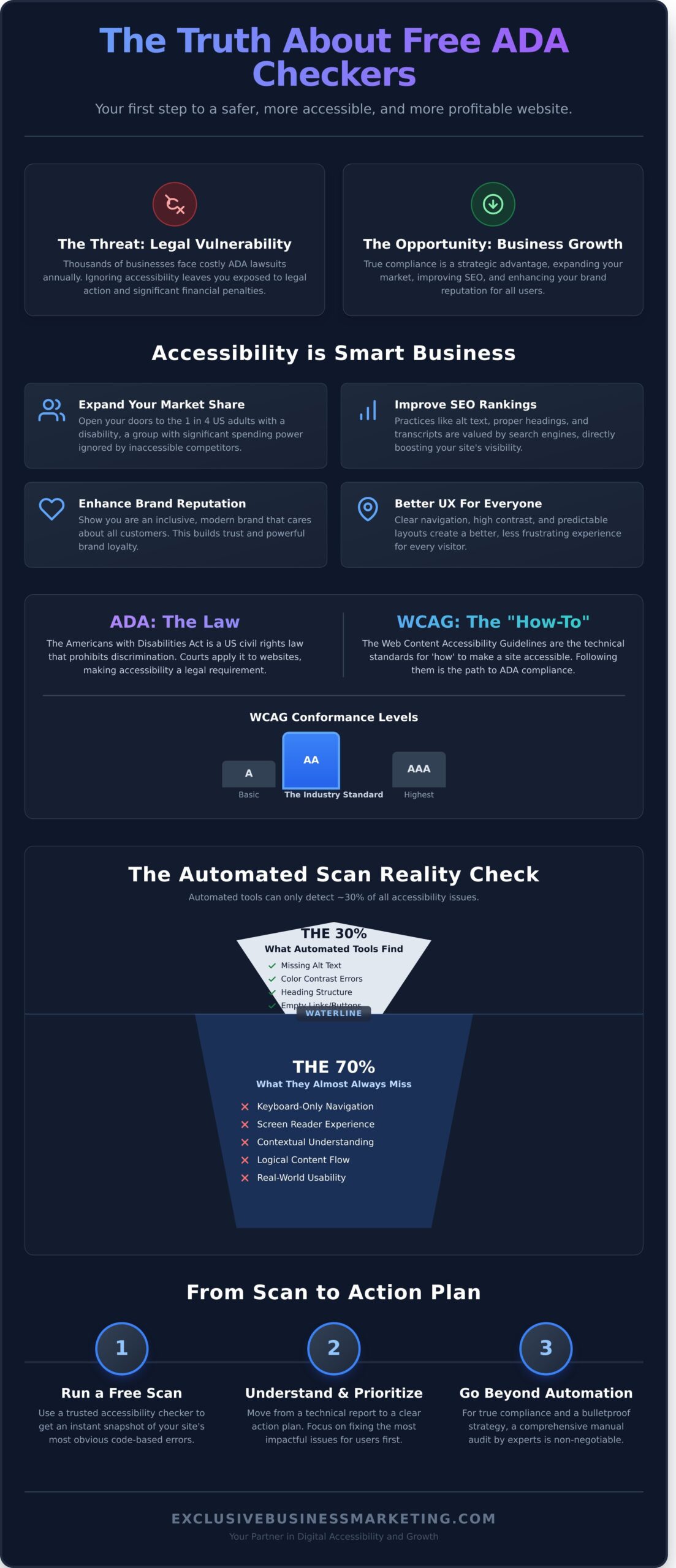
The Americans with Disabilities Act (ADA) is a US civil rights law that prohibits discrimination based on disability. Courts have consistently applied it to the digital world, meaning your website must be accessible to everyone. The “how-to” for achieving this is the Web Content Accessibility Guidelines (WCAG). Think of WCAG as the technical manual for building an accessible site. If you’re new to the topic, understanding what web accessibility is provides a foundational overview. WCAG has three levels of conformance: A (basic), AA (the accepted standard for most businesses), and AAA (the highest level, often for specialized sites).
The Business Case for Accessibility: More Than Just Lawsuits
Making your website accessible isn’t just about compliance; it’s about smart business growth. An accessible website generates tangible returns by improving key performance metrics across the board. Here’s how you win:
- Larger Market Share: You immediately open your doors to the 1 in 4 US adults living with a disability. This group represents significant spending power that your inaccessible competitors are ignoring.
- Improved SEO: Accessibility and SEO go hand-in-hand. Practices like adding alt text to images, using proper heading structures, and providing transcripts for videos are valued by search engines like Google, improving your rankings.
- Enhanced Brand Reputation: An accessible website sends a clear message: you are an inclusive, modern brand that cares about all its customers. This builds trust and fosters powerful brand loyalty.
- Better User Experience for All: Features designed for accessibility, such as clear navigation, high-contrast text, and predictable layouts, create a better, less frustrating experience for every single visitor to your site.
Understanding these benefits makes it clear why using a free ada compliance checker to assess your website is a critical first step for any modern business aiming for growth and long-term success.
How Free ADA Compliance Checkers Work (And Their Critical Limitations)
Think of a free ADA compliance checker as a spell-checker for your website’s accessibility. It’s an automated tool that scans your site’s code to find common, easily identifiable errors. This makes it an excellent first step to quickly pinpoint obvious problems and begin improving your digital experience for users with disabilities.
However, just like a spell-checker catches typos but misses poor grammar or nonsensical sentences, these tools have significant blind spots. Relying solely on an automated scan is a critical mistake. Studies show that automated tools can only detect about 30% of all potential Web Content Accessibility Guidelines (WCAG) issues. They cannot replace a comprehensive manual audit needed to understand the true user experience and meet the legal requirements for website accessibility.
What Automated Checkers Are Good at Finding
These tools excel at identifying clear, code-based violations. They provide a solid baseline report by flagging issues such as:
- Missing Image Alt Text: The most common error, where images lack a text description for screen readers.
- Color Contrast Errors: Checks if the contrast ratio between text and its background is sufficient for users with low vision.
- Heading Structure Problems: Identifies when heading levels are skipped (e.g., jumping from an <h1> to an <h3>), which confuses assistive technologies.
- Empty Links or Buttons: Flags interactive elements that have no descriptive text, leaving users unsure of their function.
What Automated Checkers Almost Always Miss
The most critical accessibility issues require human judgment and context, which is where a free ADA compliance checker falls short. These tools cannot evaluate:
- Keyboard Navigation: Can a user access every link, button, and form field using only the ‘Tab’ key? Automated tools can’t reliably test this real-world functionality.
- Screen Reader Experience: Does the content make sense when read aloud in order? Is the flow logical, or is it confusing and disjointed?
- Vague Link Text: A tool will approve a link that says “Click Here,” but it fails to provide any context for users, which is a major accessibility failure.
- Complex User Journeys: Automated scanners cannot test multi-step processes like filling out a contact form, completing a checkout, or navigating a complex menu.
Top 3 Free Accessibility Checkers to Scan Your Site Today
Navigating the world of accessibility can be complex, but you don’t need a massive budget to get started. To cut through the noise, we’ve identified the top three tools that provide immediate, actionable insights into your site’s compliance level. Each free ada compliance checker on this list offers a unique approach, giving you a powerful starting point for identifying and resolving critical accessibility barriers.
Finding the right resources often requires looking past marketing hype. Much like how critiqora.com offers honest, fluff-free reviews across various niches, we have carefully selected these tools based on their actual performance and reliability.
WAVE Web Accessibility Evaluation Tool
Developed by WebAIM, WAVE is one of the most respected and widely used accessibility testing tools. It injects icons and indicators directly onto a live version of your webpage, providing a highly visual and in-context report of potential issues. It’s an excellent educational tool for understanding how a user with disabilities might interact with your content.
How to use it: Simply go to the WAVE website and enter your site’s URL. For more dynamic testing, install the free WAVE browser extension for Chrome or Firefox to evaluate pages on the fly, including password-protected content.
- Extremely visual interface makes it easy to locate errors directly on the page.
- Trusted and respected within the accessibility community.
- Excellent for beginners learning to connect errors with WCAG principles.
Cons:
- The sheer number of icons can be overwhelming at first.
- Requires some time to learn what each icon and alert means.
axe DevTools Browser Extension
Powered by Deque Systems, a leader in digital accessibility, axe DevTools is the go-to for developers and technical teams. It integrates directly into your browser’s developer tools (like Chrome DevTools) and scans for issues based on the robust axe-core open-source engine. This tool excels at pinpointing specific code-level violations and suggesting clear remediation steps.
How to use it: Install the extension for your browser (Chrome, Firefox, Edge). Open your website, right-click and select “Inspect” to open developer tools, navigate to the “axe DevTools” tab, and click “Scan ALL of my page.”
- Integrates seamlessly into the existing developer workflow.
- Highlights the exact lines of code causing the accessibility issue.
- Provides specific guidance on how to fix problems.
Cons:
- Geared more towards users with technical or development knowledge.
- The interface is less visual and more code-focused than WAVE.
AccessibilityChecker.org
If you’re looking for a quick, high-level report, this is the simplest free ADA compliance checker available. It provides a straightforward summary of your site’s performance, grading it on a 100-point scale and listing the number of known, likely, and potential issues found. It’s a great way to get a quick snapshot of your site’s overall accessibility health.
How to use it: Visit the homepage and enter the full URL of the webpage you want to scan. The tool will generate a public report in seconds.
- Extremely simple to use-just enter a URL and go.
- Delivers a clean, easy-to-understand summary report.
- Good for getting a fast, high-level overview to share with stakeholders.
Cons:
- Primarily a lead generation tool for their paid accessibility services.
- Lacks the in-depth, in-context feedback of WAVE or axe.
I Ran a Scan… Now What? How to Understand Your Report
You’ve done the right thing and run a scan, but now you’re staring at a report full of technical jargon, warnings, and errors. It’s easy to feel overwhelmed. The good news? You don’t have to fix everything at once. The report from your free ada compliance checker is a roadmap, and the goal is to prioritize the most critical fixes to make the biggest impact first.
This section breaks down that technical report into a clear, actionable plan to improve your site’s accessibility and protect your business.
Decoding Common Errors and Warnings
Most automated tools flag a few common issues. Here’s what the most frequent errors actually mean for your users:
- Missing Alt Text: This is a text description of an image that screen readers announce to visually impaired users. Good alt text is descriptive and concise, such as “Red running shoe on a white background,” not a generic filename like “IMG_2045.jpg.”
- Low Contrast: The text color is too similar to its background color, making it difficult for people with low vision to read. Use a free online color contrast checker to find color combinations that meet WCAG standards.
- Improper Heading Structure: Your page should follow a logical outline (H1, then H2, then H3, etc.). Skipping levels, like going from an H1 to an H4, confuses screen readers and makes it hard for users to navigate the page content.
A Prioritization Framework for Business Owners
Don’t try to fix everything at random. Use this simple framework to decide what to tackle first and generate the best results for your effort.
- Level 1 (Critical): Fix these immediately. These are “showstoppers” that completely block a user from accessing content or completing a task, like a form field with no label or a pop-up that traps keyboard users.
- Level 2 (Serious): Address these next. These issues create significant barriers but might not be total roadblocks. This includes low-contrast text, links that aren’t clearly identifiable, or videos without captions.
- Level 3 (Minor): These are inconvenient but don’t prevent use. This could include redundant links or images with vague alt text that could be improved.
When a Free Checker Isn’t Enough
An automated scan is a powerful first step, but the limits of a free ada compliance checker become clear when you need comprehensive coverage. It’s time to bring in an expert if:
- Your report lists dozens or hundreds of errors and you need a clear path forward.
- Your website has complex features like e-commerce checkouts, customer portals, or interactive tools.
- You need a legal document like a VPAT (Voluntary Product Accessibility Template) to prove compliance.
Automated tools can’t replace the manual testing and strategic guidance required for full compliance. If your report is overwhelming, we can help you make sense of it. Schedule a free consultation to review your report with an expert.
From a Quick Scan to a Bulletproof Compliance Strategy
Running your website through a free ada compliance checker is a smart, proactive first step. It helps you identify glaring errors and understand the basics of digital accessibility. But it’s crucial to recognize this scan for what it is: the beginning of your journey, not the end. True WCAG and ADA compliance is an ongoing commitment that protects your business and creates a better experience for all users.
Achieving durable compliance requires moving beyond automated scans and building a comprehensive, long-term accessibility plan. This strategy ensures your website not only meets legal standards but also genuinely serves every potential customer.
The Gold Standard: A Manual Audit + User Testing
Automated tools can only detect about 30% of all accessibility issues. The only way to uncover the other 70% is through a manual audit conducted by human experts. Our specialists use the same assistive technologies your customers do, like screen readers, to navigate your site and identify the nuanced, real-world barriers that automated scans miss. This is often paired with user testing, which involves people with disabilities providing direct feedback on their experience.
Creating Your Accessibility Statement
An accessibility statement is a public page on your website that declares your commitment to digital inclusion. It demonstrates transparency, outlines the standards you’re targeting (like WCAG 2.1 AA), and provides a crucial point of contact for users who encounter an accessibility barrier. This simple page shows good faith and empowers users to help you improve. You can use a resource like the W3C’s Accessibility Statement Generator to create a solid foundation.
The Final Step: Partnering with an Accessibility Expert
Navigating the complexities of ADA compliance on your own is a significant challenge that drains resources and carries legal risk. Partnering with a professional accessibility agency is the most effective way to protect your business and ensure your digital assets are truly inclusive. A dedicated partner provides:
- Expert Remediation: Clear, actionable guidance for your developers to fix every identified issue.
- Team Training: Empowering your content creators and designers to maintain accessibility standards long-term.
- Peace of Mind: Confidence that your website is legally compliant and open to the 25% of U.S. adults living with a disability.
Stop guessing and start building a website that works for everyone. Take the definitive step toward full compliance and tap into a wider market. Get a comprehensive ADA compliance audit for your website.
Beyond the Scan: Your Path to True ADA Compliance
You’ve taken a crucial first step. Using a free ada compliance checker provides a valuable snapshot of your website’s potential issues. But as you’ve learned, automated scans can’t catch every barrier, and a report is only useful if you have a clear action plan. True accessibility goes beyond a quick check-it’s about protecting your business from legal risk and ensuring every visitor can engage with your brand.
Don’t rely on automation alone. Our team of Certified Professionals, based in Orange County, CA, are specialists in WCAG & ADA Compliant Website Design. We transform confusing reports into a bulletproof strategy that helps you avoid costly lawsuits and expand your customer base. Take the guesswork out of compliance and ensure your digital doors are open to everyone.
Get a Free Quote for a Professional ADA Compliance Audit.
Frequently Asked Questions
Can an accessibility plugin or overlay make my website 100% ADA compliant?
No, an overlay or plugin alone cannot guarantee 100% ADA compliance. While these tools can address some surface-level issues, they often fail to fix complex problems that require manual code adjustments and human judgment, such as logical navigation order or contextually accurate alt text. Relying solely on an automated overlay provides a false sense of security and will not protect your business from potential litigation. True compliance requires a combination of automated scanning and expert manual remediation.
How often should I run an ADA compliance check on my website?
You should run an ADA compliance check on your website at least quarterly. More importantly, always perform a check after making significant updates, such as adding new content, launching new page designs, or implementing new features. Website accessibility is not a one-time project; it’s an ongoing commitment. Regular checks ensure your site remains compliant and accessible to all users as it evolves, protecting your business and serving your customers effectively. Don’t set it and forget it.
Does improving website accessibility also improve my Google search rankings?
Absolutely. Improving website accessibility directly supports your SEO efforts and can improve Google rankings. Many accessibility best practices, like using descriptive alt text for images, creating a logical heading structure, and providing video transcripts, are also signals Google uses to understand your content. An accessible site provides a better user experience for everyone, which leads to lower bounce rates and longer session times-key metrics that positively impact your search performance and drive more organic traffic.
What is the average cost of an ADA website accessibility lawsuit?
The costs are significant and can cripple a business. The average ADA website accessibility lawsuit, including legal fees and settlement, typically ranges from $20,000 to over $100,000. This figure does not include the separate, mandatory cost of remediating your website to make it fully compliant. Proactively investing in accessibility is far more cost-effective than reacting to a demand letter or lawsuit. It is a critical investment to protect your revenue and brand reputation.
Is my small business website exempt from ADA compliance requirements?
No, there is no small business exemption for website accessibility. The ADA applies to any business considered a “place of public accommodation,” and courts have consistently ruled that commercial websites fall into this category, regardless of your company’s size. Assuming you are exempt is a dangerous and costly mistake. Every business that serves the public must ensure its digital properties are accessible to people with disabilities to avoid legal risk and serve the entire market.
What’s the difference between an automated scan and a manual audit?
An automated scan, like what a free ADA compliance checker provides, is a great first step. It uses software to quickly find common issues like poor color contrast or missing image alt text, catching about 30% of potential violations. A manual audit, however, is a comprehensive review by a human expert. They use assistive technologies like screen readers to test real-world usability, navigation flow, and logical structure-critical elements that automated tools simply cannot evaluate.