

What Is Accessible Design? A Practical Guide for Business Websites
The term “website accessibility” can sound intimidating, often bringing to mind complex legal codes and the fear of expensive lawsuits. But what if we told you that accessible design is actually one of the most powerful tools for business growth you’re not using? It’s not about sacrificing aesthetics or breaking your budget; it’s about opening your digital doors to every single potential customer. An inaccessible website doesn’t just risk legal trouble-it actively turns away a significant portion of the market, leaving revenue on the table.
This practical guide is built to deliver results and cut through the confusion. We will show you exactly what accessible web design means for your business in simple, clear terms. You’ll learn how implementing its core principles can drive more traffic, improve your SEO, and generate more leads. We’ll provide an actionable checklist to get you started immediately and help you understand when it’s time to partner with a professional. Get ready to build a better, more profitable website that reaches everyone.
Key Takeaways
- Move beyond compliance and learn how accessibility drives real business growth, expands your audience, and strengthens your brand reputation.
- Grasp the core concept of accessible design to ensure your website effectively serves every potential customer, regardless of their ability.
- Demystify the global accessibility standards by understanding the four simple principles that guide a user-friendly website for everyone.
- Get an actionable checklist of high-impact fixes you can implement on your site today to start improving the user experience for all visitors.
Defining Accessible Design: It’s More Than Just a Buzzword
At its core, accessible design means creating websites, tools, and technologies that can be used effectively by everyone. This approach ensures that your digital presence doesn’t exclude people with visual, auditory, motor, or cognitive disabilities. While you might think of physical structures like wheelchair ramps, web accessibility is about removing digital barriers. The goal is to create a baseline of Accessibility that ensures no one is left behind in an increasingly online world.
Implementing an accessible design strategy isn’t just a matter of compliance; it’s a powerful way to expand your audience, improve user experience for all, and strengthen your brand’s reputation as a customer-centric business.
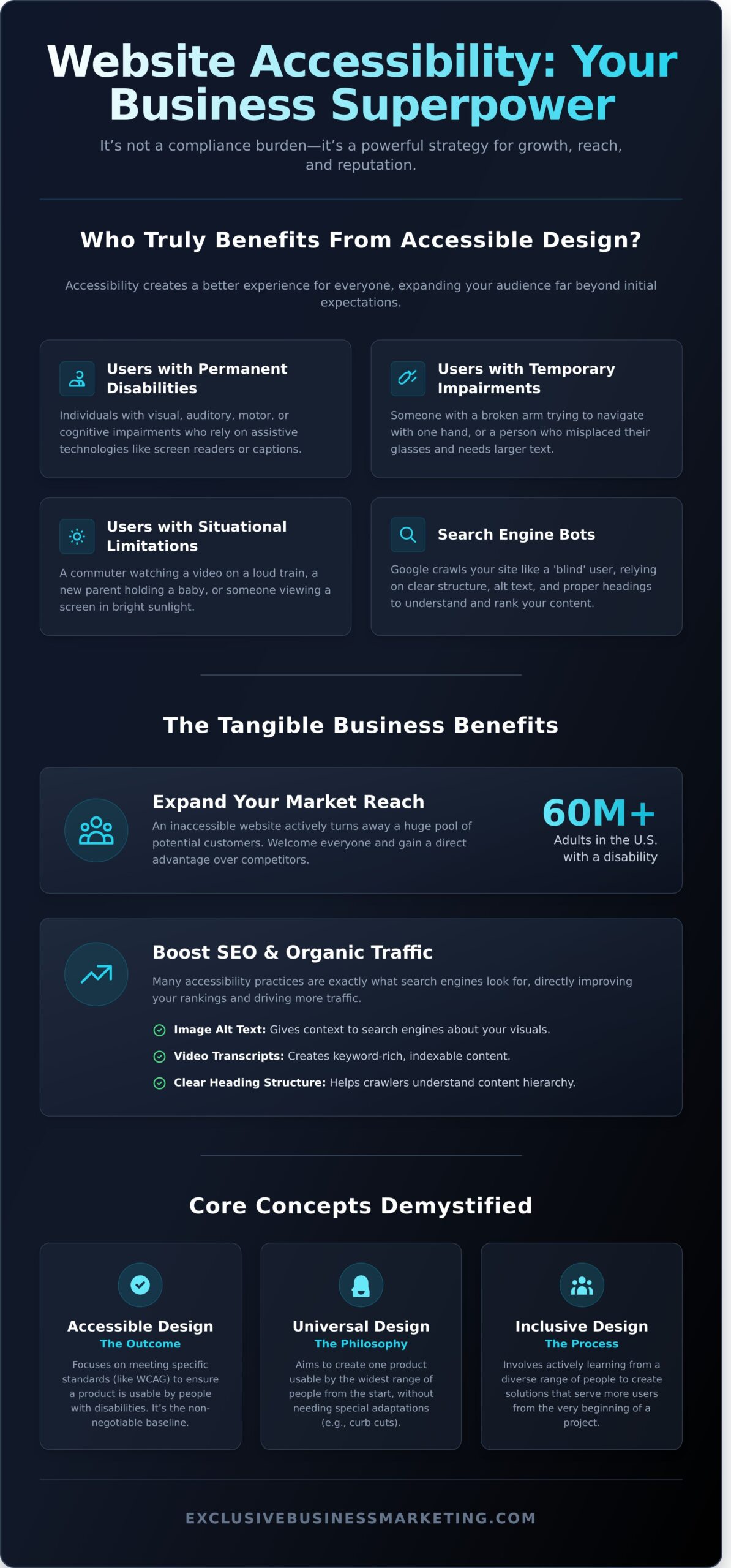
Who Benefits from Accessible Design?
Thinking about accessibility often brings to mind users with permanent disabilities, but the benefits reach much further. A truly accessible website serves a surprisingly wide audience, creating a better experience for every visitor.
- Users with permanent disabilities: This includes individuals who are blind and use screen readers, are deaf and need captions for videos, or have motor impairments that prevent them from using a traditional mouse.
- Users with temporary impairments: Someone with a broken arm trying to navigate with one hand, or a person who has misplaced their glasses and needs to zoom in on text.
- Users with situational limitations: A new parent holding a baby, a commuter trying to watch a video in a loud train station, or a user viewing their screen in bright sunlight.
- Search engine bots: Google and other search engines crawl your site like a ‘blind’ user, relying on clear structure, alt text, and proper headings to understand your content. Better accessibility almost always means better SEO performance.
Accessible Design vs. Universal Design vs. Inclusive Design
While often used interchangeably, these three concepts have distinct meanings that work together to create better digital products for all. Understanding the difference clarifies the goal.
- Accessible Design: This is the outcome. It focuses on meeting specific standards (like WCAG) to ensure a product is usable by people with disabilities. It’s a crucial, non-negotiable baseline.
- Universal Design: This is a broader philosophy. It aims to create one product that can be used by the widest range of people possible from the start, without needing special adaptations. Think of curb cuts-designed for wheelchairs but also used by people with strollers and delivery carts.
- Inclusive Design: This is the process. It involves actively seeking out and learning from a diverse range of people to create solutions that serve more users from the beginning.
Why Accessible Design is a Business Superpower, Not a Burden
Too often, businesses view website accessibility as a technical chore or a legal box to check. That’s a missed opportunity. The reality is that implementing an accessible design is one of the most powerful strategic moves you can make to drive growth, improve your marketing results, and build an unshakeable brand reputation. It’s not about compliance; it’s about competitive advantage.
By prioritizing accessibility, you create a seamless experience that benefits every single visitor, not just those with disabilities. This commitment translates directly into tangible business outcomes.
Expand Your Market Reach and Customer Base
Did you know that over 60 million adults in the United States live with some form of disability? That’s a massive market segment with significant spending power that many businesses inadvertently ignore. When your website is not accessible, you are effectively closing your digital doors to a huge pool of potential customers. An accessible site welcomes everyone, giving you a direct advantage over competitors who are turning this valuable audience away.
Boost Your SEO and Search Engine Rankings
Search engines like Google aim to provide users with the best, most relevant content. It turns out that many of the core principles of accessible design are exactly what search engines look for. Implementing accessibility best practices is a proven way to improve your SEO performance and generate more organic traffic. Consider how accessibility directly helps:
- Image Alt Text: Describes images for screen readers and gives search engines context about your visual content.
- Video Transcripts: Make audio content accessible and create keyword-rich text that search engine crawlers can index.
- Clear Heading Structure: Organizes content for easy navigation and helps search engines understand the hierarchy of your information.
These improvements create a better user experience, which can lower bounce rates and increase time on site-both positive signals that can boost your rankings.
Enhance Brand Reputation and Mitigate Legal Risks
In today’s market, customers want to support businesses that align with their values. An accessible website is a clear statement that your company is committed to inclusivity and social responsibility, building deep trust and loyalty. This proactive approach also serves as your best defense against legal challenges. Demand letters and costly ADA-related lawsuits are on the rise, creating significant financial and reputational risk. Furthermore, standards for government sites, set by regulations like the Section 508 law, often serve as a benchmark for the private sector. By investing in accessibility, you don’t just protect your business-you enhance its integrity.
The 4 Pillars of Web Accessibility (WCAG Explained Simply)
To create a universally effective website, you don’t need to memorize complex code. You just need to understand the global standard: the Web Content Accessibility Guidelines (WCAG). These aren’t just technical suggestions; they are the bedrock of effective accessible design and are so foundational that they are often referenced in the U.S. Department of Justice guidance on web accessibility as a key framework for legal compliance. The best part? WCAG is built on four simple, powerful principles, easily remembered with the acronym POUR.
Perceivable: Information Must Be Presentable to Users
Your website’s information must be available to at least one of a user’s senses. If a user can’t see, hear, or otherwise perceive your content, it might as well not exist. Analogy: Think of it like a movie theater offering both audio and closed captions. Everyone gets the full story, their own way. This means providing alternatives for your content, such as:
- Alt text for images so screen readers can describe them to visually impaired users.
- Captions and transcripts for videos for users who are deaf or hard of hearing.
Operable: Users Must Be Able to Navigate the Interface
Your site cannot demand an interaction that a user is physically unable to perform. All functionality must be available to everyone, regardless of how they use the web. Analogy: A building needs both stairs and a ramp. Both lead to the same door, but they offer different ways to get there. Your website’s interface must be just as flexible. Key examples include:
- Ensuring the entire site can be navigated using only a keyboard.
- Avoiding flashing content (between 3 to 50 flashes per second) that could trigger seizures.
Understandable: Information and Operation Must Be Clear
Users must be able to comprehend your content and operate your interface without confusion. Clarity and predictability are crucial for building trust and ensuring users can complete their goals. Analogy: This is like navigating a well-signed airport. Clear, consistent signs guide you effortlessly to your gate. Your website should be just as intuitive. This means:
- Using clear, simple language and avoiding unnecessary jargon.
- Providing consistent navigation and predictable layouts across all pages.
- Designing forms with clear labels and helpful error messages.
Robust: Content Must Be Interpretable by Various Technologies
Your content must be built with clean code that can be reliably interpreted by a wide variety of browsers and assistive technologies, both now and in the future. This technical foundation ensures your website doesn’t break when technology evolves. Analogy: It’s like writing a book in a universal language. Anyone, using any tool, can read and understand the story. To achieve this, your site must:
- Use clean, valid HTML so assistive technologies can make sense of its structure.
- Ensure it functions correctly on current and future web browsers and devices.
Mastering these four pillars is not just about compliance; it’s about maximizing your reach and driving real business growth. Creative web design companies such as Insight Multimedia build websites on these principles to ensure you connect with every possible customer.
Practical First Steps to a More Accessible Website
Improving your website’s accessibility doesn’t have to be an overwhelming technical project. You can make significant progress by reviewing a few key areas yourself. This checklist covers high-impact changes you can implement immediately to create a more inclusive user experience. Think of this as your starting point for a more effective and accessible design, building a foundation that welcomes every potential customer.
Review Your Content and Structure
A logical structure is the backbone of an accessible website. It allows screen readers and search engines to understand your content’s hierarchy and importance. Start by checking these fundamental elements:
- Use Descriptive Headings: Ensure your page has one main H1 title, followed by H2s for major sections and H3s for subsections. This creates a clear, scannable outline for all users.
- Write Meaningful Link Text: Replace vague phrases like “click here” with descriptive text. Instead, write “View our digital marketing services” so users know exactly where a link will take them.
- Add Alternative (Alt) Text: Every important image needs alt text-a short, written description of the image. This is read aloud by screen readers and appears if an image fails to load.
Check Your Colors and Readability
Visual clarity directly impacts how easily users can read and interact with your content. Poor contrast or small text can exclude users with visual impairments like low vision or color blindness.
- Test Color Contrast: Use a free online color contrast checker to ensure your text stands out clearly against its background. This is crucial for buttons, text, and links.
- Ensure Text is Legible: Your body font size should be large enough for comfortable reading on all devices, typically at least 16px.
- Don’t Rely on Color Alone: Never use color as the only way to convey information. For example, if you highlight an error in a form field in red, also include an icon or a text message explaining it.
Test Basic Keyboard Navigation
Many users with motor disabilities cannot use a mouse and rely solely on a keyboard to navigate the web. A quick test can reveal major barriers on your site. Simply put your mouse aside and use the Tab key to move through your pages. Ask yourself:
- Can you clearly see which element is currently selected (is there a visible “focus” outline)?
- Can you access all links, buttons, and menu items in a logical order?
- Can you operate interactive elements, like dropdown menus, using just your keyboard?
Evaluate Your Forms and Media
Your forms and multimedia content are critical for generating leads and engaging customers. Make sure they are accessible to everyone. Every form field must have a clear, visible label that is always present. For media, providing alternatives is a key part of an effective and accessible design. Add captions to all videos and provide transcripts for both video and audio content.
Feeling overwhelmed? This checklist is a great start, but a comprehensive approach guarantees you meet legal standards and capture the widest possible audience. Get a professional accessibility audit today!
Make Your Website Work for Everyone
You don’t have to navigate the complexities of WCAG and ADA compliance alone. As Certified Digital Marketing Professionals and specialists in WCAG & ADA Compliant Website Design, we’ve been helping Orange County businesses thrive since 2013. Let our team remove the guesswork and provide a clear path forward. Ensure your website is open to every customer. Contact us for a free accessibility analysis.
Taking this step is a direct investment in your company’s growth, integrity, and bottom line.
Frequently Asked Questions About Website Accessibility
What is the difference between ADA compliance and WCAG?
Think of it this way: The Americans with Disabilities Act (ADA) is the US law that requires accessible accommodations, but it doesn’t provide technical instructions for websites. The Web Content Accessibility Guidelines (WCAG) provide those instructions. WCAG is the globally accepted set of technical standards that details exactly how to make your website accessible. Following WCAG is the most effective way to achieve ADA compliance and open your site to all users.
Is making a website accessible an expensive project?
The cost should be viewed as an investment in your business, not an expense. The price varies depending on your site’s size and complexity. Integrating accessibility from the start of a new build is most cost-effective, but retrofitting is also a powerful option. The return on investment comes from expanding your audience, improving your SEO, and strengthening your brand reputation, all of which generate more leads and protect you from potential lawsuits.
Can my existing website be updated for accessibility, or do I need a new one?
In nearly all cases, your existing website can be updated-or retrofitted-to meet accessibility standards. A full redesign is usually only necessary for websites built on extremely outdated technology that cannot support modern accessibility features. Our team can audit your current site and implement the specific code and design fixes required to bring it into compliance, providing the most direct path to an accessible experience for your customers.
Will an accessible design make my website look plain or boring?
Absolutely not. This is one of the biggest myths about web accessibility. An effective accessible design creates a cleaner, more intuitive user experience that benefits everyone. Principles like strong color contrast, clear navigation, and legible fonts are hallmarks of great modern design. Accessibility doesn’t limit creativity; it enhances it by focusing on creating a site that is both visually appealing and functional for every single visitor.
How often should I audit my website for accessibility issues?
We recommend a full, professional accessibility audit at least once a year. However, accessibility is an ongoing commitment, not a one-time task. You should also perform smaller spot-checks quarterly or anytime you make significant changes to your website, such as adding a new page template or feature. This proactive approach ensures you remain compliant and that your website continues to serve all your potential customers effectively.
Are there free tools I can use to check my website’s accessibility?
Yes, there are several free tools that can help you perform a preliminary check. Tools like Google’s Lighthouse and the WAVE Web Accessibility Evaluation Tool can automatically identify issues like missing image alt text or poor color contrast. While these are a great starting point, automated tools can’t catch every potential issue. A manual audit by a certified professional is essential to guarantee full compliance and a truly usable site.