

How to Protect My Business from ADA Lawsuits: A 2026 Defense Guide
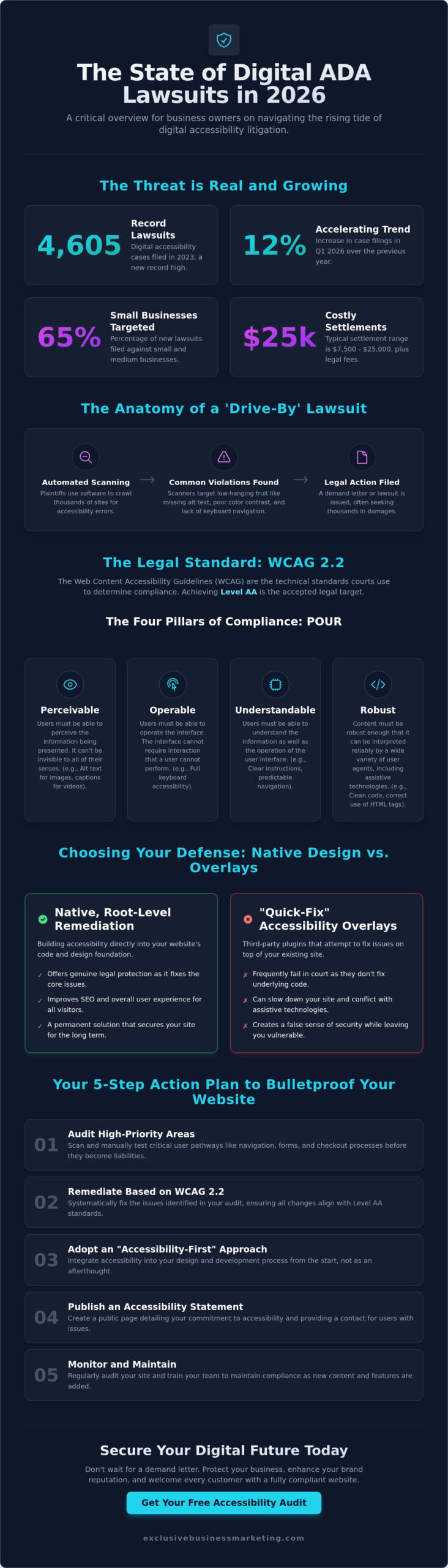
According to the 2023 UsableNet Year-End Report, digital accessibility lawsuits hit a record high of 4,605 cases, with legal filings now occurring at a rate of nearly 13 per day. It’s a staggering figure that explains why learning how to protect my business from ada lawsuits is no longer optional for growth-oriented owners. You’ve worked hard to build your brand, and the thought of a predatory serial plaintiff draining your revenue over a minor technicality is enough to keep anyone up at night. You likely worry that strict compliance will ruin your site’s design or cost a fortune in developer fees.
We understand that frustration, but you don’t have to choose between a stunning website and legal safety. Our guide provides the cutting-edge technical and strategic steps you need to follow to meet the latest WCAG 2.2 standards. We’ll show you how to shield your company from threats while actually improving your site’s reach and revenue. By the end of this article, you’ll have a comprehensive roadmap to legal immunity and a high-converting site that welcomes every visitor. Let’s secure your business and give you the peace of mind you deserve.
Key Takeaways
- Understand how serial plaintiffs use automated scanners to target businesses in 2026 and why your digital content might be at risk under Title III.
- Learn how to implement the POUR principles of WCAG 2.2 and 3.0 to ensure your website meets the gold standard for legal compliance.
- Discover why “quick-fix” accessibility overlays often fail in court and how to protect my business from ada lawsuits through native, root-level design.
- Follow a proven 5-step action plan to audit and remediate high-priority barriers like navigation and checkout processes before they become liabilities.
- See how an “Accessibility-First” design approach drives tangible revenue while securing your company’s digital future against emerging legal threats.
The State of ADA Lawsuits in 2026: Why Your Business Is at Risk
The legal environment for digital storefronts has shifted dramatically as we move through 2026. ADA website lawsuits are legal actions taken under Title III of the Americans with Disabilities Act, targeting businesses whose digital content remains inaccessible to people with disabilities. These aren’t just minor grievances. They’re aggressive legal maneuvers that can drain your bank account and damage your brand reputation overnight. ADA compliance is the practice of making digital content usable for everyone, including those with visual or hearing impairments. If you want to know how to protect my business from ada lawsuits, you must first recognize that your website is now considered a place of public accommodation, just like a physical office. In the same way that you might check out Stone Security Services to manage the security of a physical venue or high-profile event, your digital storefront requires professional protection to ensure it remains open and accessible to all.
The “Serial Plaintiff” phenomenon has evolved into a high-tech industry. These individuals and their legal teams don’t browse your site like a customer. They use automated scanners that identify missing alt-text, poor color contrast, and keyboard navigation errors in less than 30 seconds. This Web Accessibility Overview details why these standards matter for the 61 million adults in the U.S. living with a disability. For a business owner, failing to meet these standards is like leaving your front door locked to a specific group of people while a lawyer watches from the sidewalk.
The Rise of ‘Drive-By’ Digital Lawsuits
Testers now use sophisticated software to crawl thousands of sites daily, looking for low-hanging fruit. In 2024, digital accessibility filings hit a record 4,600 cases, and data from the first quarter of 2026 shows a 12% increase over last year. You aren’t safe just because you run a local shop. Small businesses now represent 65% of all new filings because they often lack the robust legal teams that giants like Amazon or Target employ. A typical settlement in 2026 ranges from $7,500 to $25,000, which is significantly higher than the cost of implementing proactive compliance tools. We see businesses losing weeks of productivity dealing with these “drive-by” claims that could have been avoided with a proper audit.
California’s Unique Legal Landscape
California remains the most dangerous state for business owners due to the intersection of the ADA and the California Unruh Civil Rights Act. This state law allows plaintiffs to claim $4,000 in statutory damages per individual violation, plus attorney fees. This makes every mistake on your website a potential multi-thousand-dollar liability. Local Orange County businesses are currently being targeted by a handful of aggressive law firms that specialize in high-volume filings. These firms often file dozens of suits in a single day against companies in Newport Beach, Irvine, and Anaheim. Just as many local companies rely on Security Guard Pros to provide professional physical protection for their storefronts, understanding how to protect my business from ada lawsuits starts with securing your digital perimeter before these firms put you in their crosshairs. We’re ready and available now to help you close these gaps and keep your revenue safe.
WCAG 2.2 and 3.0: The Technical Standards You Must Meet
Learning how to protect my business from ada lawsuits starts with mastering the technical blueprints known as the Web Content Accessibility Guidelines (WCAG). These aren’t just suggestions or “best practices” for developers. They are the specific standards federal courts and the Department of Justice (DOJ) use to determine if a website is discriminatory. For 2026, WCAG 2.2 is the benchmark you must hit, while the upcoming WCAG 3.0 is already beginning to influence how experts structure digital accessibility.
Compliance is measured in three tiers: Level A, Level AA, and Level AAA. Level A is the bare minimum and rarely satisfies legal requirements. Level AAA is the gold standard but is often technically impractical for most commercial sites. For the vast majority of businesses, Level AA is the legal target. Following the DOJ Guidance on Web Accessibility clarifies that businesses must provide effective communication, and achieving Level AA is the most reliable way to prove you’ve done exactly that.
Everything in the WCAG framework rests on the “POUR” principles. This acronym stands for Perceivable, Operable, Understandable, and Robust. If your website fails in even one of these categories, it becomes a target for litigation. Implementing a professional ada compliant website design ensures these four pillars are baked into your site’s foundation rather than tacked on as an afterthought.
Perceivable and Operable: The Big Two
Perceivability ensures that no user is left out because of a sensory disability. This means every image on your site needs descriptive “alt-text” so screen readers can explain the content to visually impaired users. You also need a color contrast ratio of at least 4.5:1 for standard text to ensure readability for those with low vision. Operability focuses on how users navigate. A compliant site must be 100% navigable via keyboard. If a user can’t use the “Tab” key to reach every link or form field without a mouse, your business is at risk.
Understandable and Robust Content
Your site must be predictable and easy to use. This includes clear error messaging on forms. If a user misses a required field, the site should tell them exactly what’s wrong instead of just refreshing the page. Robustness refers to the underlying code. Clean, semantic HTML allows assistive technologies to interpret your site’s structure without crashing or skipping content. For multimedia, 100% of your videos require accurate captions and audio descriptions. If you’re concerned about your current site’s layout, you can request a professional audit to find and fix these technical gaps before they lead to a demand letter.
Native Design vs. Accessibility Overlays: Which Protects You?
If you’re searching for how to protect my business from ada lawsuits, you’ll likely encounter “accessibility overlays.” These are third-party scripts or widgets that sit on top of your existing website code. They promise a 5-minute fix for complex compliance issues. While they sound convenient, they often create a false sense of security. Courts and accessibility advocates distinguish between “baked-in” accessibility and “bolted-on” solutions. Native design involves building accessibility into your site’s foundation, while overlays merely try to mask underlying flaws.
The Hidden Risks of ‘Quick-Fix’ Widgets
Overlays frequently fail because they interfere with the very tools they’re meant to assist. In 2023, data from UsableNet revealed that 933 lawsuits were filed against companies using accessibility widgets. These tools often conflict with screen readers, causing navigation loops or hiding content entirely. This creates a “Target on Your Back” effect. Plaintiffs’ attorneys now use automated tools to scan for these widgets, viewing them as an admission that the underlying site is non-compliant. For example, in the 2021 case of Murphy v. Kohler Co., the presence of an overlay didn’t stop the legal challenge; it highlighted the site’s failure to meet actual standards.
- Interference: Widgets often override a user’s custom screen reader settings, making the site unusable.
- Mobile Failures: Most overlays don’t function correctly on mobile devices, leaving a massive gap in your defense.
- False Promises: No automated script can fix 100% of errors, such as missing alt text or poor logical reading order.
The Benefits of Native ADA Compliant Web Design
Choosing native compliance is the most effective way to protect your business from ADA lawsuits. This approach ensures your site’s core architecture follows the Official WCAG Standards from the start. Clean, semantic HTML helps search engines crawl your site more effectively, which boosts your SEO rankings. You’re not just avoiding a lawsuit; you’re building a faster, more efficient asset. A study by Forrester found that better UX through accessible design can increase conversion rates by up to 400%.
Native design also eliminates the recurring monthly subscription fees associated with ineffective plugins. While the initial setup requires more intention, the long-term ROI is undeniable. You get a site that works for everyone, on every device, without the fear of a surprise demand letter. We focus on results that last. Don’t settle for a digital band-aid when you can have a fortress. Contact us today for a free quote on a truly compliant build. We’re ready to help you secure your digital presence now.
A 5-Step Action Plan to Bulletproof Your Website
Understanding how to protect my business from ada lawsuits requires a systematic approach. You can’t fix what you don’t measure. A proactive defense starts with a clear roadmap that addresses both technical code and user experience. Follow this five-step plan to secure your digital assets by 2026.
- Step 1: Perform a Comprehensive Audit. Use automated scanners like Axe or Lighthouse to find low-hanging fruit. Combine this with a deep manual dive to catch the nuanced errors machines miss.
- Step 2: Remediate High-Priority Barriers. Focus on the critical path to conversion. Fix broken navigation, unlabelled form fields, and checkout processes that trap keyboard users.
- Step 3: Publish an Accessibility Statement. This is your public declaration of commitment. It shows the world, and potential litigants, that you’re actively working toward full inclusion.
- Step 4: Implement Continuous Monitoring. Websites are dynamic. Every new blog post or product upload is a potential liability. Use 24/7 monitoring tools to alert your team the moment a compliance error occurs.
- Step 5: Document Your Journey. Keep a detailed log of every audit, fix, and training session. This documentation is your strongest evidence when showing the court how to protect my business from ada lawsuits through consistent, good-faith effort.
The Importance of Manual Testing
Automated tools are efficient, but they only catch about 30% to 40% of accessibility issues. They can’t tell you if a screen reader’s description of an image makes sense or if a site is logically navigable. Real human testers use tools like NVDA or JAWS to experience your site as a disabled user would. This is where website accessibility consultant services become vital. We bridge the gap between technical code and actual human compliance to ensure no one is locked out of your business.
Creating an Ironclad Accessibility Statement
An effective statement isn’t just a legal disclaimer; it’s a safe harbor. It should clearly state the WCAG 2.2 standards you’re aiming for and provide a direct communication channel for feedback. Place this link prominently in your footer. Judges often look for this document to determine if a business is acting in good faith. If a user encounters a barrier but sees a clear way to report it to you directly, they’re far less likely to call a lawyer first.
Ready to secure your business and stop worrying about legal threats? Contact us today for a free quote and let our experts handle your compliance needs.
How Exclusive Business Marketing Secures Your Digital Future
At Exclusive Business Marketing, we treat accessibility as a foundational pillar rather than a last-minute patch. We believe that a website should be a gateway for every potential customer, not a gatekeeper. Our “Accessibility-First” approach to orange county web design integrates compliance into the very first lines of code we write. This proactive strategy is the most effective way to understand how to protect my business from ada lawsuits while simultaneously expanding your market reach.
We don’t just focus on the legal defense. We focus on performance. There is a powerful synergy between digital accessibility and our seo services orange county. Search engine crawlers and assistive technologies, like screen readers, interpret website data in very similar ways. By optimizing your site’s structure, alt-text, and heading hierarchies, we help you climb the search rankings while ensuring you meet WCAG 2.2 standards. Our goal is to provide “Less to Worry About” for business owners, allowing you to focus on operations while we handle the technical complexities of the law.
Comprehensive Compliance Audits
Our process begins with an exhaustive deep dive into your existing digital assets. We don’t rely solely on automated scanners that often miss 60% of accessibility barriers. Our team performs manual testing to identify every specific obstacle, from color contrast ratios to keyboard navigation failures. We provide detailed reports that clearly outline every issue on your current site. Instead of handing you a list of errors, we walk you through the results so you understand the logic behind the requirements. We want you to feel confident in your digital defense. Call us today at 1-866-WEB-MKTG for a preliminary scan of your site and see where you stand.
Results-Oriented Implementation
Once we identify the gaps, we move into the execution phase. We build and remediate websites to ensure they are beautiful, fast, and 100% WCAG compliant. According to 2024 industry data from WebAIM, 96.3% of homepages still have detectable WCAG failures. We make sure your business is in the elite 4% that gets it right. Our commitment doesn’t end at launch. We provide ongoing support to ensure your site remains compliant as you add new content, products, or blog posts. Don’t wait for a process server to knock on your door. You should contact us today for a free quote and secure your business’s digital future before 2026 brings new legal challenges.
Future-Proof Your Digital Assets Today
The legal landscape in 2026 doesn’t leave room for “good enough” when it comes to digital accessibility. With the Department of Justice emphasizing WCAG 2.2 and the emerging WCAG 3.0 standards, your website must be built for inclusion from the ground up. Relying on quick-fix overlays won’t stop a demand letter; only native, accessible design provides the technical foundation needed to stay safe. Understanding how to protect my business from ada lawsuits requires a shift toward professional, certified audits and manual remediation that actually meets federal expectations.
Exclusive Business Marketing is ready to handle the heavy lifting so you can focus on growth. Our team of WCAG 2.2 and 3.0 Certified Professionals is available 7 days a week to ensure your site remains a high-performing, compliant asset. We offer a 1-hour response guarantee because we know your time is valuable. Don’t wait for a legal challenge to force your hand. Take control of your digital future right now and build a site that welcomes every user while securing your bottom line.
Secure your business with an ADA compliant website design. Contact us today for a free quote!
Frequently Asked Questions
What is the average cost of an ADA website lawsuit settlement in 2026?
Settlement costs typically range between $5,000 and $25,000 per case depending on the complexity of the digital barriers. You also have to account for plaintiff legal fees which often exceed $15,000 according to 2025 legal industry surveys. These figures don’t include your own defense costs or the price of fixing the site. We handle the technical side so you don’t face these draining expenses. Contact us today for a free quote.
Can my business be sued if I have an accessibility plugin installed?
Yes, you can still face litigation because plugins often fail to fix core code issues. In 2024, over 900 lawsuits targeted websites that used accessibility overlays or widgets. These tools usually don’t make your site fully WCAG 2.2 compliant. Real protection requires manual code updates and expert design. We provide comprehensive solutions that go beyond surface-level fixes. Contact us today for a free quote.
Is ADA compliance mandatory for small businesses with fewer than 15 employees?
ADA compliance is mandatory for your business regardless of how many people you employ. Title III of the ADA applies to all places of public accommodation, which courts consistently define to include websites. Even a solo entrepreneur can be sued for digital barriers. Learning how to protect my business from ada lawsuits starts with recognizing that size doesn’t grant legal immunity. Contact us today for a free quote.
How often should I perform an accessibility audit on my website?
You should perform a full accessibility audit at least twice a year or after any major site update. Digital content changes frequently, and 2026 standards require constant monitoring of your user interface. Regular audits ensure that new blog posts or product pages don’t break your compliance. Our team provides scheduled reviews to keep your site safe and functional. Contact us today for a free quote.
Does ADA compliance help my website’s Google ranking?
ADA compliance directly improves your SEO and Google ranking. Search engines reward sites with clear heading structures, descriptive alt text, and high readability. These are the same elements required for WCAG 2.2 standards. By making your site accessible, you’re also making it easier for Google to crawl and index your content. We optimize your site for both humans and search engines. Contact us today for a free quote.
What are the most common website errors that lead to ADA lawsuits?
Missing alt text for images and poor color contrast are the top triggers for litigation. According to 2024 data, 70% of demand letters cite keyboard navigation failures. These errors make it impossible for screen reader users to navigate your shop or contact forms. We identify these specific vulnerabilities during our initial scan. This is a critical step in learning how to protect my business from ada lawsuits. Contact us today for a free quote.
How long does it take to make a website fully ADA compliant?
A standard compliance project takes between 4 and 12 weeks to complete. Small sites with 10 pages might be ready in 30 days, while complex e-commerce platforms require more intensive coding. We work fast to minimize your window of legal exposure. Our certified professionals handle every technical detail to ensure your site meets the latest standards. Contact us today for a free quote.
Is there a tax credit available for making my website accessible?
Small businesses can claim the Disabled Access Credit under Section 44 of the IRS Code. This provides a non-refundable credit of up to $5,000 per year for eligible access expenditures. Your business must have total revenues of $1,000,000 or less or fewer than 30 full-time employees to qualify. This credit makes professional compliance much more affordable for growing companies. Contact us today for a free quote.