

How to Check Your Website for Accessibility: A Step-by-Step Guide
That sinking feeling when you hear about another business hit with a website accessibility lawsuit is real. You know your site needs to be accessible for everyone, but the alphabet soup of WCAG and ADA compliance can feel overwhelming. Where do you even begin? Are those free online checkers enough? It’s time to trade that uncertainty for a clear, actionable plan. We’re here to demystify the process and show you exactly how to check your website for accessibility with confidence.
In this step-by-step guide, you will learn our practical, three-level process for auditing your own site. We’ll cover everything from powerful automated tools that find problems quickly to the essential manual checks that no software can replace. You’ll walk away with a clear picture of your website’s accessibility status, a plan to fix the most critical issues, and the confidence that you are providing a great experience for all users-all while protecting your business from legal risk.
Key Takeaways
- Understanding website accessibility is the first step to protecting your business from legal risks and reaching a wider audience.
- Follow a simple 3-level framework to systematically find and address accessibility issues, from quick automated scans to essential manual tests.
- Learn several no-code-required manual tests to check website for accessibility yourself, catching critical issues that automated tools often miss.
- Discover how to prioritize accessibility fixes for the greatest impact and learn when a professional audit is necessary to ensure full compliance.
Why Checking Website Accessibility Isn’t Optional Anymore
In today’s digital marketplace, ensuring your website is accessible to everyone isn’t just a good idea-it’s a fundamental requirement for growth and risk management. More than just a box to tick, Web Accessibility is about creating an inclusive online space that welcomes all potential customers. When you proactively check your website for accessibility, you’re not just mitigating legal threats; you’re unlocking new revenue streams and building a stronger, more reputable brand.
The Legal Risks: ADA and Your Website
The Americans with Disabilities Act (ADA) requires businesses to provide equal access, and courts increasingly rule that this applies to websites as “places of public accommodation.” This has triggered a dramatic spike in litigation, with thousands of federal lawsuits filed against businesses of all sizes each year. Non-compliance exposes your company to significant financial risk, including hefty legal fees, costly settlements, and mandated website overhauls. Don’t wait for a demand letter to take action.
The Business Case: More Than Just Compliance
Beyond avoiding lawsuits, a fully accessible website delivers a powerful return on investment. The principles of accessibility directly overlap with SEO best practices, boosting your search rankings. For example:
- Descriptive alt text on images helps visually impaired users and search engine crawlers understand your content.
- Proper heading structure (H1, H2, H3) creates a logical flow for screen readers and signals content importance to Google.
- Clean, semantic code improves site performance and makes your content easier for all technologies to parse.
Furthermore, you open your doors to a massive market. In the U.S. alone, adults with disabilities control over $490 billion in disposable income. By providing a seamless user experience for everyone, you enhance your brand’s reputation, improve conversion rates, and drive sustainable growth. The universally accepted standard for achieving this is the Web Content Accessibility Guidelines (WCAG).
This holistic approach to online presence is why many businesses partner with digital marketing experts who understand that accessibility is a core component of effective branding and user engagement. A strong online brand, as showcased by firms like buzz-media.uk, is built on a foundation that is welcoming to all potential customers.
A 3-Level Framework for a Thorough Accessibility Check
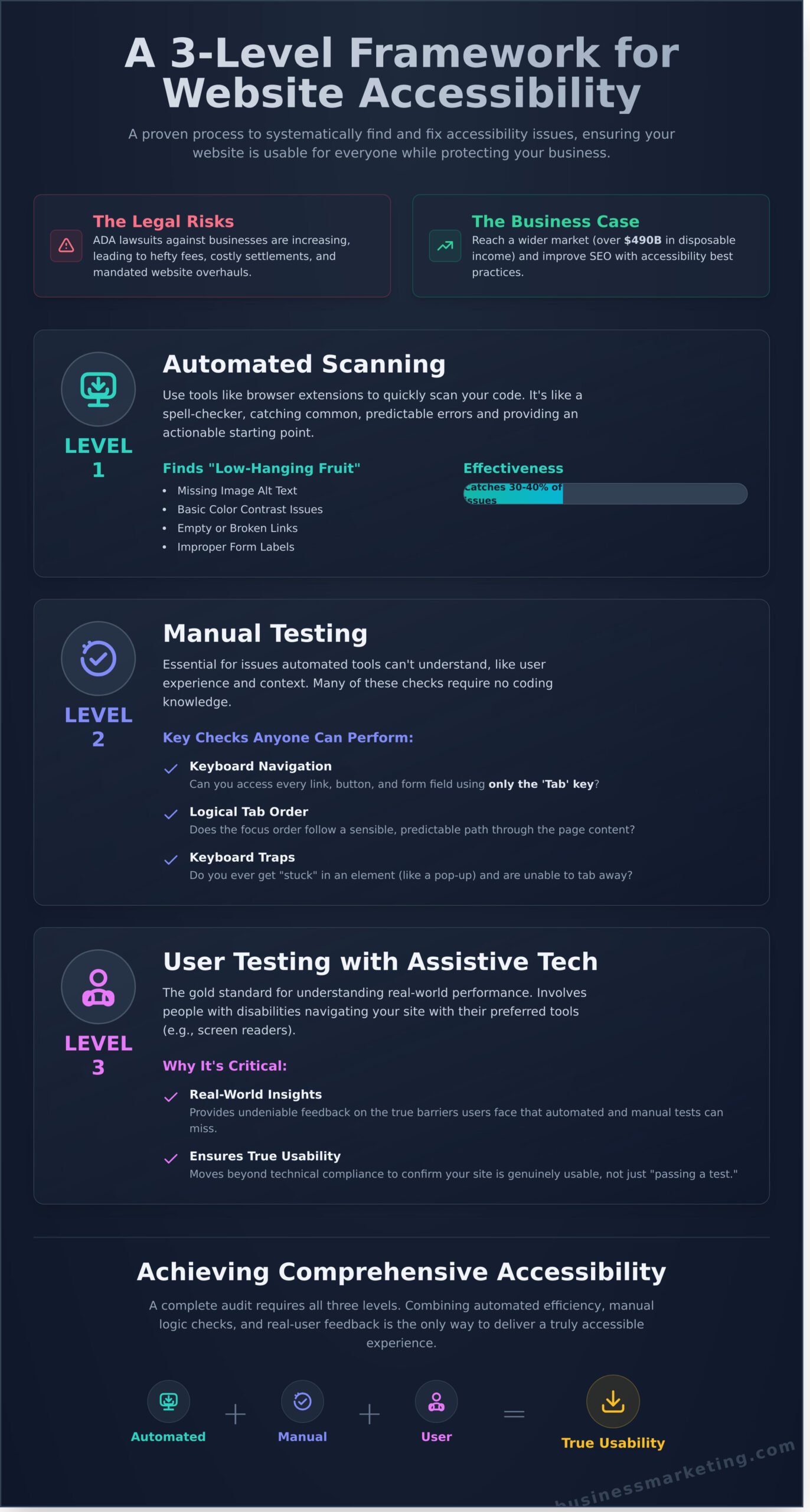
To effectively check your website for accessibility, you need a structured plan, not just a random series of tests. A haphazard approach wastes time and misses critical issues that can alienate customers. We use a proven 3-level framework that moves from broad, automated scans to detailed, human-centered analysis. Following this process ensures you catch the widest range of potential barriers and generate measurable improvements for all your users. A complete check requires all three levels to deliver real-world results.
Level 1: Automated Scanning
Start with automated tools to get a quick, high-level overview of your site’s health. These tools are like a spell checker for your code, catching up to 30-40% of common accessibility errors. They excel at finding low-hanging fruit like missing image alt text, basic color contrast problems, and empty links. The W3C maintains a comprehensive list of accessibility evaluation tools that can scan your site in minutes, providing an actionable starting point for your fixes.
This principle of accessibility extends to all media on your site. For instance, if you’re producing audio content like a podcast, ensuring it’s professionally recorded and transcribed is key to reaching every visitor. You can learn more about how to get started with high-quality audio production.
Level 2: Manual Testing
Automated tools can’t understand context or user experience, which is why manual testing is essential. This level focuses on logical flow and usability, identifying issues that frustrate users but don’t always trigger an automated error. Many of these checks are straightforward and don’t require deep technical knowledge. Key areas to test include:
- Keyboard Navigation: Can you access and operate every interactive element-links, buttons, forms-using only the Tab key?
- Logical Order: Does the tab order follow a sensible, predictable path through the page content?
- Keyboard Traps: Do you ever get stuck in an element, like a pop-up or video player, unable to tab away?
Level 3: User Testing with Assistive Technology
This is the gold standard for understanding how your website performs in the real world. This process involves recruiting people with disabilities to navigate your site using their preferred assistive technologies, such as screen readers or voice control software. Their direct feedback provides undeniable insight into the true barriers on your site. While complex, this is the only way to be certain your website is not just compliant, but genuinely usable for everyone. This level of testing is a core component of any professional accessibility audit.
To truly grasp the importance of this human-centered approach, it’s helpful to learn from leaders who have direct experience with assistive technology. Keynote speaker Michael Hingson offers powerful talks on leadership and teamwork, drawing from his perspective as a blind professional to inspire a more inclusive mindset in business.
Level 1: Using Automated Tools to Find Easy Wins
The fastest way to start is by using automated accessibility checkers. These are powerful software programs-often browser extensions or built-in developer tools-that scan your website’s code and flag common issues that violate Web Content Accessibility Guidelines (WCAG). They are your first line of defense, designed to find the “low-hanging fruit” and give you an immediate, actionable list of improvements.
However, it’s critical to understand their limitations. Automated tools can only detect about 30-40% of all potential accessibility issues. They cannot understand context, user experience, or the logical flow of your content. They will produce false positives and miss many critical barriers. Think of them as a spell-checker for accessibility: helpful for catching obvious mistakes, but no substitute for a comprehensive manual review.
Recommended Free Accessibility Checkers
To get a reliable initial report when you check your website for accessibility, start with these industry-trusted tools. You don’t need all of them; pick one and run your first scan.
- WAVE by WebAIM: A popular and highly reliable browser extension that injects icons and indicators directly onto your web page, providing powerful in-context feedback.
- Google Lighthouse: Built directly into Chrome DevTools, Lighthouse generates a performance report that includes a dedicated accessibility score and a list of specific elements to fix.
- Accessibility Insights for Web: A robust extension from Microsoft that offers both a “FastPass” automated check and detailed, guided manual testing procedures to find more complex issues.
How to Run Your First Scan
Using a browser extension like WAVE is incredibly straightforward. You can get your first report in under a minute. Simply follow these steps:
- Install your chosen extension from the browser’s web store.
- Navigate to the web page you want to test.
- Click the extension’s icon in your browser toolbar to activate the scan.
The tool will immediately overlay a report on your page or open a summary in a new panel, showing you exactly where the potential issues are located.
Understanding the Tool’s Report
The initial report can feel overwhelming, but don’t panic. Your goal is to identify clear, high-impact fixes. Most tools use a simple color-coded system:
- 🔴 Errors: These are high-priority problems that are definite violations, such as an image missing its descriptive alt text or a form field without a label. Start here.
- 🟡 Alerts: These are items you should review manually. The tool suspects an issue but can’t be certain without human judgment.
- 🔵 Contrast Errors: A specific type of error flagging text that is too difficult to read against its background.
Focus on fixing the red “Errors” first. Use this report as your initial to-do list, not a final grade. For a deeper understanding of a complete testing process, it’s wise to review the official accessibility testing guidance from government resources, which covers both automated and manual checks. This automated scan is just the first step toward a genuinely accessible website.
Level 2: Essential Manual Checks Anyone Can Perform
You don’t need to be a web developer to spot major accessibility issues. In fact, some of the most effective tests require nothing more than your keyboard and a keen eye. Taking a few minutes to personally check your website for accessibility gives you a real-world understanding of the user experience you are providing.
Follow this simple, no-code checklist to uncover critical usability barriers on your site. Think of this as walking in your customers’ shoes-if you get stuck, they will too.
The Keyboard Navigation Test
Many users with motor disabilities rely solely on a keyboard to navigate the web. This test reveals if your site works for them. Put your mouse aside and use only your keyboard.
- Use the Tab key: Press Tab to move forward through interactive elements like links, buttons, and form fields. Use Shift+Tab to move backward.
- Look for a focus indicator: Can you clearly see which element is selected? There should be a visible outline or highlight around the active item.
- Check for “keyboard traps”: Can you access every interactive element? Do you ever get stuck in one section, unable to tab away?
Checking for Descriptive Links and Headings
Vague link text and a chaotic heading structure can make your site confusing for everyone, especially for users of screen readers. Scan your pages and ask yourself: Do your links say “Click Here” or “Learn More”? This offers no context. Good link text clearly describes its destination, such as “View Our Digital Marketing Services.” Similarly, headings should create a logical outline (H1 for the main title, H2 for main sections, H3 for subsections).
Evaluating Your Forms and Images
Your contact forms and images are critical for generating leads and conveying information. Ensure they are accessible to all potential customers. Every form field must have a clear, visible label telling the user what information to enter. After filling it out, is it obvious how to submit the form? For images that convey important information, make sure they have descriptive alternative text (alt text) so users who cannot see them still get the message.
Making Sense of the Results: How to Prioritize and Fix Issues
Once you check your website for accessibility, you’ll likely have a list of errors, warnings, and potential improvements. This can feel overwhelming, but the key to making progress is understanding that not all issues carry the same weight. Your goal isn’t to fix everything at once; it’s to systematically eliminate the most significant barriers that prevent users from achieving their goals on your site.
A Simple Prioritization Matrix
Use this straightforward framework to categorize every issue you’ve found. This will transform a long list of problems into a clear, actionable roadmap for your development team.
- High Priority: These are critical blockers that prevent users from completing core tasks. They must be fixed immediately. Examples include a non-functional “Add to Cart” button for keyboard users, a contact form that can’t be submitted, or a complete failure to navigate the site using a screen reader.
- Medium Priority: These issues create significant difficulty or frustration but may have a workaround. While not complete blockers, they severely impact the user experience. This could be missing alt text on important images, confusing navigation links, or videos without captions.
- Low Priority: These are minor inconveniences that don’t block access to essential functions. They should be addressed but aren’t urgent. Examples include insufficient color contrast on non-critical text or redundant links that create minor confusion.
Creating an Action Plan
With your issues categorized, it’s time to turn your findings into concrete tasks. Document every issue discovered from both your automated scans and manual tests in a spreadsheet or project management tool. Assign a priority level (High, Medium, or Low) to each item based on the matrix above. From there, create a detailed ticket or task list for your web developer, including screenshots and clear instructions on how to replicate the problem. This ensures nothing gets lost and provides a clear path to a more accessible website.
Overwhelmed by the audit results? Don’t let a long list of fixes stop your progress. Let our experts create a clear action plan for you.
When DIY Isn’t Enough: The Value of a Professional Accessibility Audit
Automated tools and basic manual checklists are a great first step. They help you catch low-hanging fruit and understand the fundamentals of digital compliance. However, these methods only scratch the surface. They cannot replicate the nuanced experience of a user navigating with a screen reader, nor can they interpret the complex context required for true WCAG (Web Content Accessibility Guidelines) conformance. When you need to move beyond a basic check and ensure your site is genuinely usable and legally sound, it’s time to invest in a professional.
A comprehensive audit is the only way to get a complete picture of your website’s accessibility posture and protect your business from potential litigation. It’s not just about ticking boxes; it’s about ensuring every potential customer can engage with your brand successfully.
What’s Included in a Professional Audit?
A professional audit goes far beyond what free online tools can offer. It’s a multi-layered analysis performed by certified experts who understand both the code and the human experience. Our comprehensive process is designed to give you a clear, actionable path to full compliance.
- Full-Spectrum Testing: We combine automated scanning to catch widespread issues, meticulous manual code review for context-specific errors, and hands-on testing with assistive technologies like screen readers and keyboard-only navigation.
- Actionable Reporting: You receive a detailed report, such as a Voluntary Product Accessibility Template (VPAT) or Accessibility Conformance Report (ACR), that clearly identifies every issue, explains its impact, and provides code-level recommendations for your developers to implement fixes quickly.
- Expert Remediation Strategy: We don’t just hand you a report and walk away. Our team provides expert guidance to help you prioritize fixes and develop a long-term strategy for maintaining an accessible website.
Finding the Right Partner
Choosing the right agency is critical to achieving meaningful results. You need a partner with a deep understanding of the technical and legal landscape. Look for a team that can demonstrate a proven track record of helping businesses like yours become fully ADA and WCAG compliant. A full-service agency like Exclusive Business Marketing not only identifies the problems but also has the in-house expertise to fix them, providing a seamless, worry-free solution.
Stop guessing about your website’s compliance. Protect your business, expand your audience, and build a truly inclusive online presence. Get a free, no-obligation quote for a professional website audit.
Your Path to a Compliant and Inclusive Website
Making your website accessible is no longer a “nice-to-have”-it’s a fundamental requirement for modern business success and legal compliance. This guide has equipped you with a practical framework, starting with automated tools to catch low-hanging fruit and progressing to essential manual tests that reveal user experience roadblocks. Understanding how to check website for accessibility is the critical first step. The real impact, however, comes from turning that knowledge into a prioritized action plan that creates a seamless experience for every visitor, regardless of ability.
While these steps provide a powerful start, achieving full compliance and mitigating legal risk requires expert precision. You don’t have to navigate this complex landscape alone. As Certified Professionals in ADA Compliant Website Design, Exclusive Business Marketing has a proven track record of protecting Orange County businesses since 2013. Stop guessing about your compliance and get the clarity you need to move forward with confidence. Get your free, instant accessibility report now!
Take the first step today toward building a website that welcomes everyone.
Frequently Asked Questions About Website Accessibility
What is the difference between ADA and WCAG?
The Americans with Disabilities Act (ADA) is a U.S. civil rights law that prohibits discrimination based on disability. It sets the legal requirement for accessibility but doesn’t provide specific technical rules for websites. The Web Content Accessibility Guidelines (WCAG) are the globally recognized technical standards that detail exactly how to make your website accessible. Courts consistently use WCAG as the benchmark to measure a website’s ADA compliance, making it the essential standard to follow.
How often should I check my website for accessibility?
Website accessibility is an ongoing commitment, not a one-time fix. You should check your website for accessibility whenever you add new features, redesign pages, or publish significant new content. For optimal protection and user experience, we recommend a comprehensive manual audit at least once a year, supplemented by quarterly automated scans. This proactive schedule ensures your site remains compliant and accessible to all potential customers as it evolves, generating long-term returns on your investment.
Can a website be 100% accessible and compliant?
While achieving 100% perfect accessibility for every user in every context is a difficult moving target, your website can and should achieve 100% conformance with a specific standard, such as WCAG 2.1 Level AA. This is the accepted benchmark for legal compliance and demonstrates a powerful commitment to inclusion. The goal is to build a robust, accessible foundation and engage in continuous monitoring and improvement to maintain that high standard over time.
Are there WordPress plugins that can make my site accessible?
WordPress accessibility plugins can be a helpful part of a larger strategy, but they are not a complete solution. These tools can automate some technical fixes, like adding ARIA labels or identifying some color contrast issues. However, they cannot solve complex problems that require human judgment, such as logical content structure, keyboard navigation flow, or writing descriptive alt text. Relying only on a plugin creates a false sense of security and will not make your site fully compliant.
Does using an accessibility overlay or widget make my site compliant?
No, an accessibility overlay or widget will not make your website compliant and can significantly increase your legal risk. These tools apply a temporary “fix” over your site’s code, but they do not address the core accessibility barriers. Furthermore, many overlays interfere with the assistive technologies they are meant to support, creating a worse user experience. The only proven and effective method for compliance is to remediate accessibility issues directly within your website’s source code.
How much does a professional website accessibility audit cost?
The cost to professionally check your website for accessibility depends on the size and complexity of your site. A simple automated scan may cost a few hundred dollars, but it won’t catch most issues. A comprehensive manual audit by a certified expert, which is necessary for true compliance, typically ranges from $1,500 to over $10,000. This audit provides a detailed roadmap for remediation and is a critical investment to protect your business and expand your market reach.