

2026 ADA Compliance Checklist for California Businesses
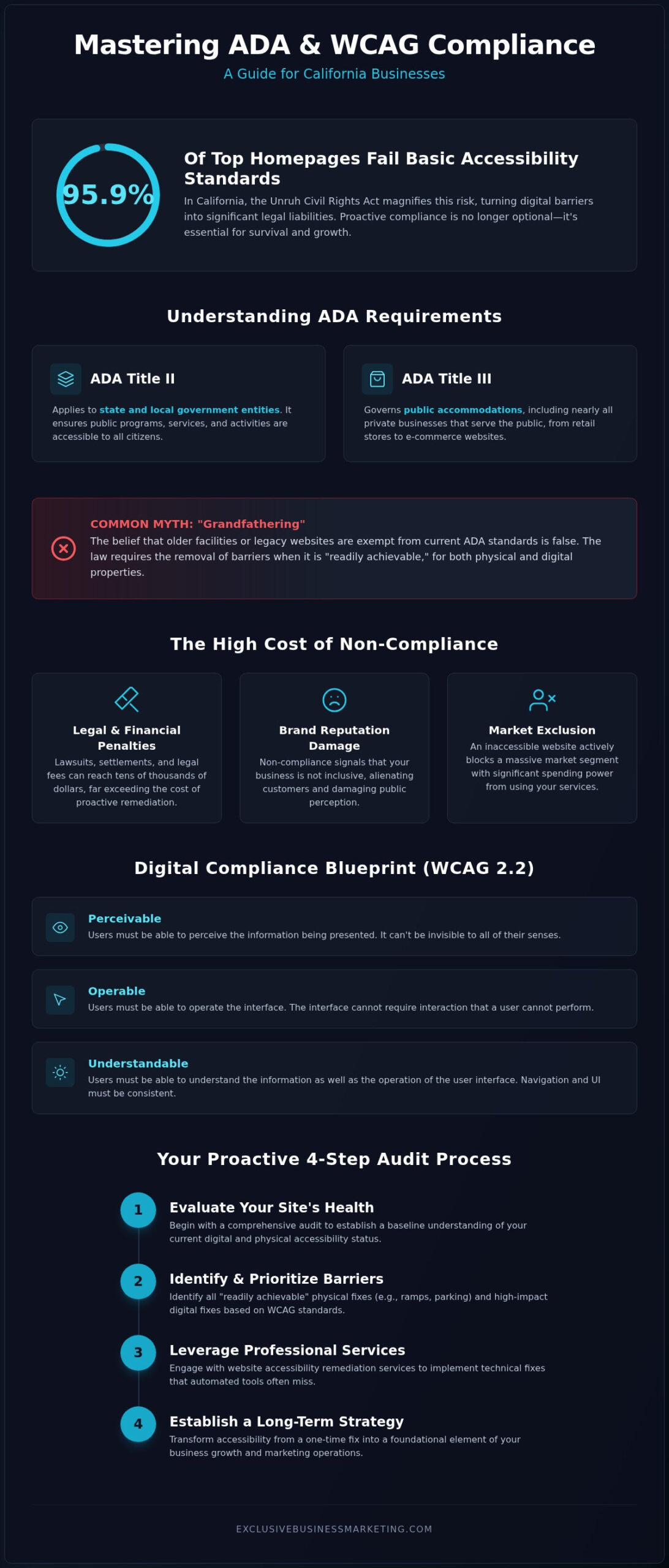
Did you know that 95.9% of the world’s top homepages failed basic accessibility standards this past year? In California, where the Unruh Civil Rights Act makes digital barriers a major legal liability, staying compliant isn’t just a suggestion; it’s a necessity. You’ve likely felt the anxiety of watching lawsuit numbers climb while wondering if your current website accessibility remediation services are actually doing enough to protect you. It’s frustrating to face complex technical requirements when you just want to focus on serving your customers and growing your brand.
We understand that the gap between physical ADA requirements and digital WCAG standards feels overwhelming. That’s why we’ve built this guide to help you master the 2026 landscape. By following a structured plan, you can gain total peace of mind and open your doors to every potential client. This article provides a clear, step by step checklist for California businesses to ensure their digital and physical spaces meet the latest benchmarks. We’ll cover exactly what the law requires today so you can stop worrying about legal threats and start focusing on your results.
Key Takeaways
- Learn to distinguish between ADA Title II and Title III requirements while debunking common myths about “grandfathering” for existing California facilities.
- Discover how to apply WCAG 2.2 standards to make your digital content perceivable and accessible to a much wider audience.
- Identify “readily achievable” physical barriers and prioritize high-impact fixes like compliant ramps and accessible parking to secure your storefront.
- Master a proactive four-step audit process to evaluate your site’s health and determine when to leverage professional website accessibility remediation services.
- Establish a long-term compliance strategy that transforms accessibility from a one-time fix into a foundational element of your business growth and marketing.
Understanding ADA Title II and Title III Requirements in 2026
The Americans with Disabilities Act (ADA) hasn’t stayed stagnant over the last decade. In 2026, understanding the distinction between Title II and Title III is the first vital step toward securing your business. Title II applies specifically to state and local government entities. It ensures that public programs, services, and activities are accessible to all citizens. Conversely, Title III governs “public accommodations.” This category includes nearly every private business that interacts with the public, from local coffee shops to massive e-commerce platforms. ADA compliance is a fundamental civil rights requirement, not just a building code or a technical suggestion. This means your business must provide goods, services, and programs on an equal basis to every individual, regardless of their physical or digital abilities.
It’s a dangerous myth that older facilities or legacy websites are “grandfathered” into compliance. In 2026, the law is clear: you must remove barriers in existing facilities when such removal is “readily achievable.” For your digital storefront, this often requires professional website accessibility remediation services to align with the Web Content Accessibility Guidelines. Waiting for a legal challenge to modernize your accessibility strategy is a high-risk gamble that rarely ends well for the business owner.
Who Must Comply with ADA Standards?
If your business operates as a public accommodation, you must comply. This category is broad, covering retail stores, restaurants, professional offices, and even private schools. While the “readily achievable” standard provides some flexibility based on a company’s resources and employee count, the expectation for digital accessibility has become much stricter. California businesses face unique pressure because of the Unruh Civil Rights Act. This state law allows individuals to sue for damages for every instance of discrimination. It makes California a primary hub for accessibility litigation, often resulting in higher stakes for local owners who fail to audit their platforms.
The Consequences of Non-Compliance
Ignoring these standards leads to more than just a letter from a lawyer. The rise of “drive-by” digital lawsuits means that automated bots can scan your site for errors in seconds. Settlements and legal fees can easily reach tens of thousands of dollars, often costing far more than proactive updates. Beyond the financial hit, non-compliance actively excludes a massive market segment and damages your brand reputation. Transitioning to a proactive ADA compliant website design is the most effective way to protect your assets. Investing in website accessibility remediation services now ensures you reach every customer while avoiding the crushing costs of a legal battle.
The Comprehensive Digital ADA Compliance Checklist (WCAG 2.2)
In 2026, the Web Content Accessibility Guidelines (WCAG) 2.2 represent the definitive standard for digital inclusivity. While legal precedents often point toward version 2.1, staying ahead with 2.2 ensures your business is future-proofed against evolving regulations. The Department of Justice provides official guidance on web accessibility that reinforces these core principles. To achieve true compliance, your site must be Perceivable, Operable, and Understandable. This means every user, regardless of their visual or motor abilities, should be able to process and interact with your content without friction. For instance, “Understandable” implies that your navigation and UI operation are consistent across all pages, preventing confusion for those using assistive technology.
Professional website accessibility remediation services focus on these core pillars to remove barriers that automated tools often miss. It’s not just about passing a scan; it’s about creating a functional experience for everyone. This proactive approach helps you reach a market segment that controls billions in spending power. If you aren’t sure where your site stands, you can request an audit report to identify immediate gaps in your digital presence and start your journey toward total compliance.
Visual and Audio Accessibility Essentials
Your content is only as good as its visibility. Mandatory Alt Text is required for all functional images so screen readers can describe them to visually impaired users. This isn’t just for search engine benefits; it’s a civil rights requirement. Additionally, your text must maintain a contrast ratio of at least 4.5:1 against its background. This ensures readability for users with low vision or color blindness. For video commercials and audio clips, you must provide accurate captions and full transcripts. Without these, you are effectively locking out users who are deaf or hard of hearing.
Navigation and Technical Interaction
A site is only Operable if it doesn’t require a mouse. Many users rely entirely on keyboard-only navigation; they use the “Tab” key to move through menus and links. If a user gets “trapped” in a menu they can’t exit, your site is non-compliant. Your site must include clear focus indicators, which are visual outlines that show exactly where a user is on the page at all times. Finally, form accessibility is critical for your bottom line. Every input field needs a clear label and descriptive error messages. If a user can’t fix a form error because the instructions are vague, you’ve lost a customer and increased your legal risk. High quality website accessibility remediation services ensure these technical interactions are seamless and error-free.
Physical Accessibility: Architectural Barriers and Readily Achievable Fixes
Physical accessibility remains the traditional foundation of the ADA. While digital compliance and website accessibility remediation services are dominating headlines in 2026, you can’t ignore your physical storefront. For existing small businesses, the legal benchmark is the “readily achievable” standard. This means you must remove architectural barriers if doing so is easy to accomplish without significant difficulty or expense. It’s a sliding scale based on your business size and financial resources. If you’re operating in California, the Unruh Civil Rights Act makes these physical requirements even more critical. Even minor violations can lead to statutory damages, making proactive fixes a smart financial move.
Federal guidelines establish a clear hierarchy for remediation to help you prioritize your budget. Priority 1 is simply getting people through the door. This involves accessible parking and clear paths from public sidewalks. Priority 2 moves inside, focusing on access to the specific areas where your goods and services are sold. Priority 3 addresses restroom access, which remains a frequent target for litigation in California. Even if your digital presence is perfect, physical barriers can leave you vulnerable. Just as you would follow the WCAG 2.2 guidelines for your website, you must follow the 2010 ADA Standards for Accessible Design for your building to ensure total protection.
Parking and Entrance Standards
Your compliance journey starts in the parking lot. You must provide at least one van-accessible parking space for every six accessible spots. These require an eight-foot wide access aisle to accommodate lift-equipped vehicles. Once at the door, threshold heights shouldn’t exceed 1/2 inch, and the force required to open the door should be minimal. Generally, interior doors shouldn’t require more than five pounds of force to operate. Don’t forget the International Symbol of Accessibility. Clear, high-contrast signage must be posted at every accessible entrance to guide your visitors properly and demonstrate your commitment to inclusivity.
Interior Paths and Service Counters
Once inside, your layout must allow for easy movement. Maintain a clear path of travel that is at least 36 inches wide throughout the facility. This ensures wheelchair users can navigate aisles without obstruction. If you have service counters, at least one section must be lowered to a maximum height of 36 inches. This allows for comfortable, face-to-face interaction with customers who are seated or have a limited reach. Finally, scan your walls for protruding objects. Anything sticking out more than four inches between 27 and 80 inches off the ground is a hazard for visually impaired guests. Addressing these physical details alongside your website accessibility remediation services creates a truly inclusive and legally sound brand.
How to Conduct a Website Accessibility Audit in 4 Steps
Audit your digital presence before a plaintiff’s attorney does it for you. A systematic audit is the only way to identify hidden barriers and build a defensible compliance strategy for 2026. Start with a scan. Use an automated accessibility checker to generate a baseline report of common errors like missing alt text or broken links. This provides an immediate “to-do” list but remember that software has limits. Second, perform manual keyboard testing. Unplug your mouse and try to navigate your primary user flows, including menus and checkout buttons, using only the “Tab” and “Enter” keys. If you get stuck in a loop, your customers will too.
Third, experience your site through a screen reader like NVDA. This reveals if your content structure is logical or if your site sounds like a jumble of disconnected words to a visually impaired user. Finally, document every finding. Create a prioritized remediation plan that lists every issue, the required fix, and a target completion date. This document serves as your roadmap and demonstrates your “good faith effort” toward compliance if your business ever faces legal scrutiny.
Automated vs. Manual Testing
Don’t rely solely on automated tools. Research shows that free, automated scans typically catch only about 30-40% of WCAG issues. They miss complex problems like logical reading order, the context of alt text, and the functionality of interactive widgets. True compliance requires manual testing by experts who understand how people with disabilities actually interact with the web. By investing in professional website accessibility remediation services, you ensure that the other 60-70% of potential legal liabilities are addressed before they become a problem.
Prioritizing Your Remediation Efforts
Fix your “blockers” first. These are critical issues that prevent a user from completing a core task, such as filling out a contact form or checking out. If a user can’t give you their information or money, that’s your highest risk area. Focus your energy on high-traffic pages like your homepage and service descriptions next. These are the most likely entry points for both customers and legal bots. Once you’ve started the process, publish an Accessibility Statement on your site. This public-facing page should state your commitment to inclusivity, provide a way for users to report barriers, and outline your ongoing progress toward WCAG 2.2 standards. This transparency builds trust and can often deter predatory lawsuits by showing you’re actively working on website accessibility remediation services.
Beyond the Checklist: Implementing a Sustainable Compliance Strategy
Compliance isn’t a one-time project you can finish and forget. It’s a continuous commitment to your customers and your brand’s legal safety. Every new blog post, product image, or landing page can introduce fresh barriers if you aren’t careful. Integrating these standards into your Orange County web design process ensures that accessibility is a foundational element rather than an afterthought. You must train your team on the daily essentials of digital inclusivity. This includes teaching social media managers to use descriptive alt text and ensuring your marketing team uses accessible heading structures in every email campaign. When accessibility becomes part of your culture, you build a sustainable shield against predatory lawsuits.
Focusing on inclusivity also delivers a massive return on investment. Accessible websites are generally more user-friendly for everyone, leading to lower bounce rates and higher conversion levels. By reaching the significant portion of adults who live with some form of disability, you aren’t just checking a box. You’re capturing a market segment that many of your competitors are still ignoring. This proactive approach turns a legal requirement into a powerful engine for tangible growth and long-term customer loyalty.
Accessibility as an SEO Powerhouse
Google and accessibility standards share a common goal: making content easy to find and understand. Proper use of alt text provides context for search engine crawlers, while a logical heading structure helps Google index your pages more effectively. These technical details directly boost your search rankings. There is also a direct correlation between clean, accessible code and improved site speed. Websites that load faster and work perfectly on mobile devices are prioritized in search results. For businesses in Huntington Beach, demonstrating this level of professional care positions your brand as a leader in the local market. It proves that you value every visitor’s experience.
Partnering with an ADA Compliance Expert
DIY checklists are helpful, but they can’t replace the assurance of an expert. When your site grows in complexity, you need professional website accessibility remediation services to handle the technical heavy lifting. Exclusive Business Marketing manages every detail of the remediation process, from deep-dive manual audits to the final technical fixes. We remove the operational burden from your shoulders so you can focus on running your business. Our team ensures your platform stays compliant as standards evolve, providing you with total peace of mind. Contact us today for a professional audit report and expert remediation to protect your business and reach every customer in 2026.
Secure Your Future with Proactive Accessibility
ADA compliance is no longer a static goal but a dynamic foundation for business growth. By mastering the distinction between Title II and Title III and implementing WCAG 2.2 standards, you protect your brand from the rising tide of digital litigation. Remember that physical barriers and digital gaps are equally critical in the eyes of California law. A sustainable strategy requires constant monitoring and a commitment to inclusive design that reaches every customer. This proactive approach doesn’t just lower your legal risk; it supercharges your SEO and opens your doors to a massive, underserved market.
Our team of California-based experts in Huntington Beach specializes in navigating these complex 2026 requirements. We provide professional website accessibility remediation services that handle the technical details so you can focus on your results. Our comprehensive audit reports identify every ranking and accessibility gap, giving you a clear path to total compliance.
Take the first step toward peace of mind today. You have the tools and the checklist to transform your business into an inclusive leader in your industry. We are ready to help you build a more accessible and successful digital presence right now.
Frequently Asked Questions
Does my small business website really need to be ADA compliant in 2026?
Yes, your website must be compliant to avoid significant legal risk. Federal courts consistently rule that ADA Title III applies to digital storefronts as places of public accommodation. For California business owners, the stakes are even higher because local laws allow for statutory damages per violation regardless of your company’s size or revenue.
What is the difference between WCAG 2.2 and ADA compliance?
The ADA is the actual federal law that prohibits discrimination, while WCAG 2.2 is the technical “rulebook” used to measure compliance. Think of the ADA as the legal requirement and WCAG 2.2 as the specific set of instructions for your web developer. Meeting these technical standards is the most effective way to prove your site is legally accessible.
Can I use an accessibility overlay or plugin to become fully compliant?
No, overlays and automated plugins are not a complete solution for legal safety. These tools often fail to fix deep-rooted code issues and can even create new barriers for users with screen readers. True protection comes from manual website accessibility remediation services that address the core architecture of your site rather than just adding a visual layer.
How much does an ADA website audit cost for a California business?
Audit costs depend entirely on the size of your website and the complexity of your interactive features. A simple site with a few pages is much faster to review than a massive e-commerce platform with thousands of products. You should view an audit as a specialized professional service that provides a legally defensible roadmap for your business.
What are the most common ADA website compliance mistakes to avoid?
The most frequent errors include missing alt text on images, low color contrast that makes text unreadable, and navigation that requires a mouse. Many businesses also forget to provide captions for their video marketing. Avoiding these common pitfalls helps you stay off the radar of predatory law firms that use automated bots to find easy targets.
How often should I check my business website for accessibility issues?
You should perform a baseline check at least once every quarter. Accessibility isn’t a “set it and forget it” task because every new blog post or plugin update can introduce fresh errors. Regular monitoring ensures that your website accessibility remediation services remain effective and that your site stays compliant as your content grows.
Is there a tax credit available for making my business ADA compliant?
Yes, eligible small businesses can often claim the Disabled Access Credit to help offset the costs of becoming compliant. This federal tax credit is designed to encourage inclusive business practices by covering a portion of your remediation expenses. You should consult with your tax professional to see how this applies to your specific 2026 filing.
What is the Unruh Civil Rights Act and how does it affect me?
The Unruh Act is a California-specific law that prohibits discrimination by any business establishment. It’s more aggressive than federal law because it allows individuals to sue for monetary damages for every instance they encounter a barrier. This is why California is a primary hub for accessibility lawsuits and why local businesses must be extra vigilant.