

The Ultimate ADA Compliance Checklist for Websites in 2026
Is the threat of a costly ADA lawsuit keeping you up at night? If you’re overwhelmed by technical jargon like WCAG and unsure where to even start auditing your website, you are not alone. Ignoring web accessibility doesn’t just risk alienating a huge segment of potential customers-it exposes your business to serious legal and financial penalties. It’s time to stop worrying and take decisive action to protect your brand and your bottom line.
We’ve developed the ultimate ada compliance checklist for 2026 to give you a clear, actionable path forward. This isn’t a dense legal document; it’s a straightforward, step-by-step guide designed for business owners. Inside, you will find exactly what to look for, how to identify critical issues, and the concrete steps to take to safeguard your company. Get the peace of mind that comes from knowing your website is secure, compliant, and truly open for business to everyone.
Key Takeaways
- Master the core of website accessibility: ADA compliance is achieved by meeting WCAG standards, protecting your business while expanding your customer reach.
- Learn to audit your website against the three pillars of accessibility: ensuring content is perceivable, navigation is operable, and information is understandable.
- Use our step-by-step ada compliance checklist to proactively identify the most common accessibility errors on your site, from missing alt text to confusing navigation.
- Create a clear action plan to resolve compliance issues, distinguishing between quick fixes you can handle and technical tasks that require a developer.
Understanding Web Accessibility: The ‘Why’ Behind the Checklist
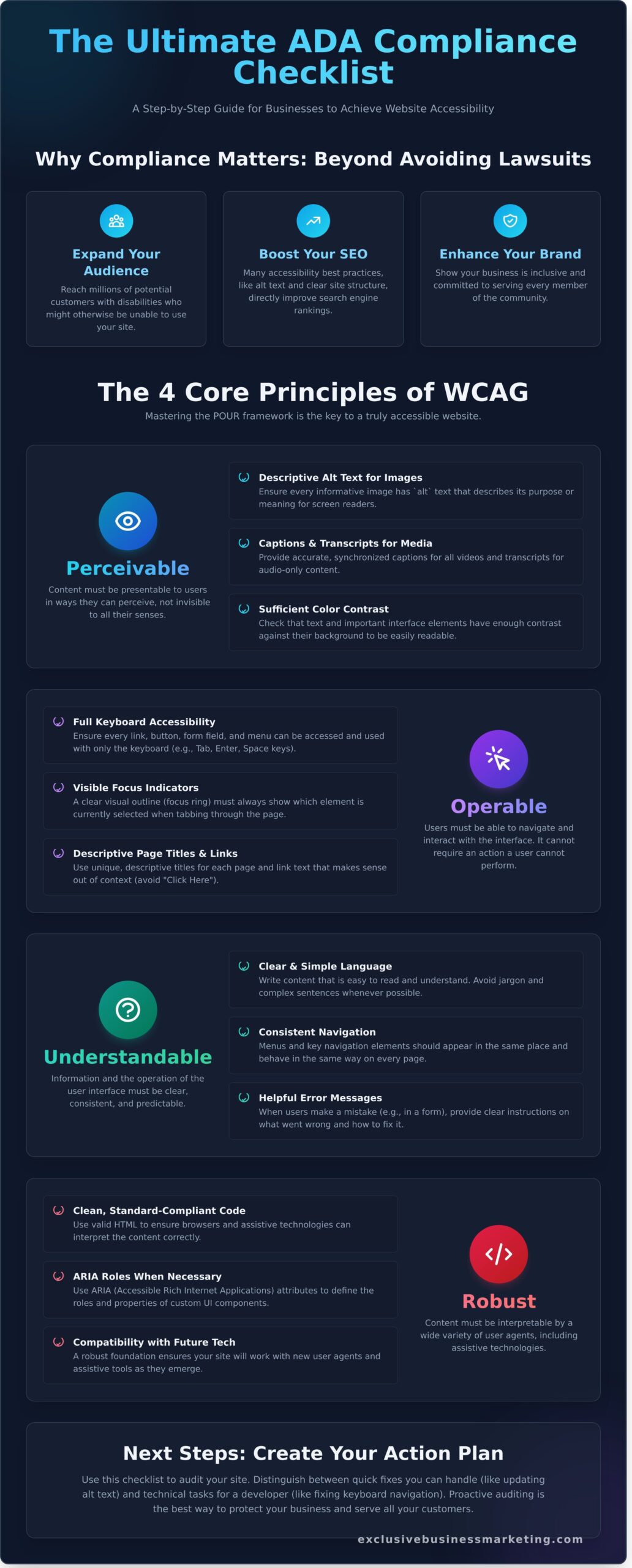
When business owners search for an ada compliance checklist, they often think of physical building codes. But for your website, compliance means adhering to a different set of rules: the Web Content Accessibility Guidelines (WCAG). These are the globally recognized technical standards for making your digital presence accessible to people with disabilities. A foundational Understanding Web Accessibility is crucial, because getting it right delivers powerful business results.
Implementing these standards isn’t just about avoiding costly lawsuits. It’s about generating real growth by:
- Expanding Your Audience: Reach millions of potential customers with disabilities who may otherwise be unable to use your site.
- Boosting Your SEO: Many accessibility best practices, like alt text and clear site structure, directly improve search engine rankings.
- Enhancing Your Brand: Show that your business is inclusive and committed to serving every member of the community.
This focus on accessibility should extend to every part of your business, including recruitment. For instance, if you are looking to hire in the Georgia area, you can visit SavannahJobs.com to explore their guide on local hiring and digital outreach.
This checklist is structured around the four core principles of WCAG, which form the acronym POUR. Mastering them is the key to a truly accessible website.
Principle 1: Perceivable
Your website’s content and interface components must be presentable to users in ways they can perceive. This means the information cannot be invisible to all of their senses. It’s about providing alternatives for users who may not be able to see or hear. Key examples include adding descriptive “alt text” to images for screen readers and providing accurate captions for all video content.
Principle 2: Operable
Users must be able to operate the interface and navigate your site effectively. This principle ensures your website doesn’t require an interaction that a user with a motor disability cannot perform. The most critical element here is keyboard accessibility. Every function on your site, from navigating menus to submitting forms, must be achievable using only a keyboard, without requiring a mouse.
Principle 3: Understandable
It’s not enough for users to access your content; they must also be able to understand it. This principle focuses on making your information and user interface clear, consistent, and predictable. This involves using plain language, maintaining a logical navigation structure across your site, and providing helpful, easy-to-understand error messages when a user makes a mistake.
Principle 4: Robust
Your content must be robust enough to be interpreted reliably by a wide variety of user agents, including current and future assistive technologies. This is the technical foundation of your site’s accessibility. It means using clean, standard-compliant code so that screen readers and other tools can parse your content accurately today and adapt to new technologies tomorrow.
The Perceivable Checklist: Content for All Senses
For your website to be accessible, users must be able to perceive the information it presents. This means your content cannot be invisible to all their senses. This principle, “Perceivable,” is the most common area where business websites fail basic compliance. It requires you to provide text alternatives for non-text content and design with flexibility, ensuring no user is left behind because they can’t see a low-contrast color or hear an uncaptioned video. This section of our ada compliance checklist gives you the actionable steps to get it right.
Images and Graphics (WCAG 1.1)
Images communicate information instantly, but they create barriers for visually impaired users relying on screen readers. Your goal is to provide a text-based equivalent for every image.
- Descriptive Alt Text: Every image that conveys information (like a product photo, icon, or chart) must have descriptive alt text that clearly states its purpose or meaning.
- Null Alt Text for Decoration: Purely decorative images (like background patterns or stylistic borders) should have empty alt text (
alt=""). This tells screen readers to ignore them, preventing unnecessary noise for the user. - Avoid Text in Images: Whenever possible, present text as actual text, not an image of text. This ensures it can be resized and read by assistive technologies.
Audio and Video Content (WCAG 1.2)
Multimedia content is highly engaging but completely inaccessible to users with hearing or visual impairments without proper alternatives. Meeting these standards is not just a best practice; it aligns with official guidance from the Department of Justice on providing equal access to all web content. Don’t let your valuable video marketing assets become a liability.
- Captions for Video: All pre-recorded videos must have accurate, synchronized captions for users who are deaf or hard of hearing.
- Transcripts for Audio: Any audio-only content, like a podcast, requires a full text transcript.
- Audio Descriptions: Videos must include an audio description track that narrates important visual information (actions, on-screen text) for users who are blind or have low vision.
Visual Presentation and Structure (WCAG 1.3 & 1.4)
A clean, modern design is crucial, but it must be functional for everyone. This part of your ada compliance checklist ensures your site’s structure and visual choices don’t exclude users with low vision, color blindness, or cognitive disabilities.
- Logical Structure: Use proper HTML headings (H1, H2, etc.) and lists to structure content. Don’t rely on font size or color alone to create a visual hierarchy.
- Color Contrast: Standard text must have a color contrast ratio of at least 4.5:1 against its background to be readable for users with vision impairments.
- Color is Not the Only Cue: Never use color as the only way to convey information. For example, mark required form fields with an asterisk, not just a red color.
- Text Resizing: Ensure users can zoom in and resize text up to 200% without the layout breaking or content becoming unreadable.
The Operable Checklist: Can Everyone Use Your Website?
A visually stunning website that your customers can’t actually use is a failed investment. The ‘Operable’ principle of web accessibility focuses squarely on functionality: can a user successfully navigate your site and interact with every button, link, and form? For many individuals, especially those with motor disabilities who may not use a mouse, this is the most critical part of their online experience. These functional requirements are not just best practices; they are central to the Official DOJ Web Accessibility Guidance, which outlines how businesses can meet their legal obligations under the ADA.
An operable site is one that is forgiving, provides users with enough time to complete tasks, and does not rely on a single method of interaction. Use the following points to ensure your website is functional for all.
Keyboard Accessibility (WCAG 2.1)
Many users rely exclusively on a keyboard to navigate the web. Your website must be fully controllable without a mouse. Test your site by unplugging your mouse and trying to get around. This part of your ada compliance checklist will reveal functional gaps you never knew you had.
- Full Tab Navigation: Can you reach every interactive element-links, buttons, form fields-using only the ‘Tab’ key? The order of selection should be logical and predictable.
- Visible Focus Indicator: As you tab through the site, is it always crystal clear which element is selected? A visible outline (the ‘focus indicator’) must be present and easy to see.
- ‘Skip to Main Content’ Link: For keyboard users, tabbing through a large navigation menu on every single page is frustrating. A ‘skip’ link at the very top allows them to jump directly to the primary content.
- No Keyboard Traps: Can a user tab into an element (like a video player or pop-up) and then get stuck, unable to tab away? This is a ‘keyboard trap’ and a major accessibility barrier.
Navigation and Timing (WCAG 2.2, 2.3, 2.4)
A well-structured site is an accessible site. Clear navigation helps all users find what they need, while flexible timing ensures no one is left behind because they need more time to read or act.
- Descriptive Page Titles: Does each page have a unique and descriptive
<title>tag? This is the first thing screen readers announce, helping users orient themselves. - Clear Link Text: Avoid generic link text like ‘Click Here’ or ‘Learn More.’ The anchor text should clearly describe the link’s destination, such as ‘View Our Digital Marketing Services.’
- Seizure Safety: Content that flashes or blinks more than three times per second can trigger seizures. Remove or modify these hazardous elements immediately.
- Sufficient Time: If your site has a time limit for any task, such as filling out a form, you must provide a way for the user to turn it off, adjust it, or extend it.
The Understandable Checklist: Is Your Website Clear and Predictable?
Use these points to evaluate whether your website’s structure and content are genuinely accessible to all minds.
Readability and Language (WCAG 3.1)
Your message is useless if it can’t be understood. Clear language and proper technical setup are non-negotiable for both users and assistive technologies. Your goal is to eliminate ambiguity and present information as simply as possible.
- Language Identification: Is the primary language of each page declared in the code (e.g.,
<html lang="en">)? This tells browsers and screen readers how to pronounce the content correctly. - Simple Writing: Is your content written clearly and concisely? Avoid unnecessary jargon, complex sentences, and industry-specific slang that could confuse your audience. For instance, a brand with a strong, unique voice like The Sasquatch Coffee Company must still ensure its story is presented simply so that all customers can access it.
- Define Acronyms: Are abbreviations and acronyms explained upon their first use? For example, “Search Engine Optimization (SEO).”
Predictability and Consistency (WCAG 3.2)
A predictable website builds user confidence and reduces errors. When components look and behave the same way across your entire site, users don’t have to re-learn how to navigate each new page. Consistency is the key to a frictionless experience.
- Consistent Navigation: Are your main navigation menus located in the same place on every single page?
- Consistent Components: Do elements with the same function (e.g., “Download PDF” icons, “Submit” buttons) look and act consistently throughout the site?
- No Unexpected Changes: Do links or controls cause a sudden change, like opening a new window or pop-up, without warning the user first? Always provide a heads-up.
Forms and Error Handling (WCAG 3.3)
Online forms are a critical point of interaction, and they are often where businesses lose customers. Clear instructions and helpful error messages prevent user frustration and increase form completion rates, driving more leads and sales for your business.
- Clear Labels: Does every form field have a clear, visible label that is always present, not just placeholder text that disappears?
- Required Field Indicators: Are required fields explicitly marked, typically with an asterisk (*) and an explanation that an asterisk indicates a required field?
- Helpful Error Messages: When a user makes a mistake, are the errors easy to identify, understand, and fix? The message should be specific, like “Please enter a valid 10-digit phone number.”
- Submission Review: For forms involving financial transactions or legal commitments, can users review, confirm, and correct their information before the final submission?
Getting this part of your ada compliance checklist right is crucial for creating a site that serves every potential customer. If you need an expert to ensure your website is clear, predictable, and fully compliant, the team at Exclusive Business Marketing is ready to help you build a site that generates results.
Next Steps: How to Fix Issues and Stay Compliant
Working through an ada compliance checklist is a powerful first step toward building a more inclusive and legally sound website. But what comes next? Achieving and maintaining accessibility is an ongoing commitment, not a one-time project. While some issues you’ve identified are simple content fixes, others involving your site’s code will require a developer. Here’s a clear path forward.
Using Automated Tools
Automated checkers are excellent for identifying low-hanging fruit. They can quickly scan your site and flag common problems like poor color contrast, missing form labels, and empty image alt tags. However, it’s critical to understand their limitations. These tools can only detect about 30% of all potential accessibility issues because they cannot understand context or evaluate the real-world user experience. Use them for an initial assessment, but don’t stop there.
See where you stand. Get a Free Automated Website Scan Today and get an instant report on your site’s most obvious issues.
The Importance of Manual Testing
To uncover the other 70% of accessibility barriers, manual testing is essential. This process involves navigating your website exactly as a user with a disability would-using only a keyboard or employing a screen reader like NVDA or JAWS. Manual testing is the only way to discover critical user experience flaws like confusing navigation, illogical reading orders, and “keyboard traps” where a user gets stuck. True compliance depends on this human-centered approach.
When to Hire an ADA Compliance Expert
While DIY methods have their place, professional guidance is often necessary to reduce legal risk and ensure comprehensive compliance. You should seek expert help immediately if you’ve received an accessibility demand letter. For large or complex websites, a professional audit is the most efficient way to get a complete remediation roadmap. An expert from Exclusive Business Marketing provides not only technical solutions but also documentation that demonstrates your good-faith effort to comply.
Don’t leave your business exposed. Schedule A Call with our ADA Compliance Team to protect your brand and serve all your customers.
Turn Your Checklist into Action and Achieve Full Compliance
You now have the framework to build a more inclusive and legally sound website. Remember, true accessibility goes beyond a simple to-do list; it’s about ensuring every user can perceive, operate, and understand your digital content. This comprehensive ada compliance checklist is your roadmap, guiding you through the essential WCAG principles and highlighting critical areas for improvement. It’s the first step in protecting your business and expanding your audience.
Navigating the path from audit to remediation can be complex, but you don’t have to do it alone. At Exclusive Business Marketing, our Certified Professionals in WCAG & ADA Compliant Website Design are ready to provide a clear, actionable remediation plan. We specialize in helping businesses across Orange County avoid costly lawsuits and achieve lasting compliance. Let us take the guesswork out of accessibility so you can focus on what you do best. Contact us today for a free ADA compliance quote and website audit.
Take decisive action today. An accessible, high-performing, and compliant website is not just a goal-it’s a powerful business asset waiting to be unlocked.
Frequently Asked Questions
What is the difference between ADA, Section 508, and WCAG?
Think of it this way: The ADA is the U.S. civil rights law requiring equal access, which courts apply to websites. Section 508 is a specific federal law requiring government agencies and contractors to be accessible. WCAG (Web Content Accessibility Guidelines) are not laws themselves, but the technical standards everyone follows to meet the legal requirements of the ADA and Section 508. Following WCAG is the proven method to achieve digital accessibility and legal protection.
Is ADA compliance a legal requirement for my small business website?
Yes, it is a critical legal requirement. U.S. courts have consistently ruled that commercial websites are “places of public accommodation” and must comply with the ADA, regardless of the business’s size. If your business serves the public, your website must be accessible. This not only prevents expensive lawsuits but also expands your market reach to include customers with disabilities, driving potential new revenue and improving your brand’s reputation for inclusivity.
Can I get sued if my website is not ADA compliant?
Absolutely. Website accessibility lawsuits are a real and growing threat, targeting businesses of all sizes across every industry. These legal actions can result in tens of thousands of dollars in legal fees, settlements, and court-ordered website remediation. Proactively ensuring your website is compliant is the single most effective action you can take to protect your business from this significant financial and reputational risk. Don’t wait for a demand letter to take action.
What is an accessibility statement and do I need one?
An accessibility statement is a public page on your website declaring your commitment to digital accessibility. It outlines the specific standards you follow (like WCAG 2.1 AA), details your site’s accessibility features, and provides contact information for users who encounter a barrier. While it doesn’t replace actual compliance, having a statement is a highly recommended best practice. It demonstrates good faith and provides a valuable resource for your users.
How much does it cost to make a website ADA compliant?
The cost varies widely based on your site’s size, complexity, and its current level of non-compliance. A simple website might only need minor fixes costing a few hundred dollars, while a large, complex e-commerce platform could require an investment of several thousand for a full audit and remediation. The most cost-effective strategy is to build accessibility into your design from the start. We can provide a clear quote to get your site compliant.
How often should I audit my website for accessibility?
For optimal protection and performance, we recommend a comprehensive professional audit at least once per year. You should also perform checks whenever you add new features, publish significant new content, or complete a site redesign. Regular monitoring is a crucial part of any forward-thinking ada compliance checklist. It ensures you maintain compliance as your website and digital accessibility standards evolve, keeping your business protected and your site open to everyone.