

How to Avoid Website Accessibility Lawsuits: A 2026 Business Guide
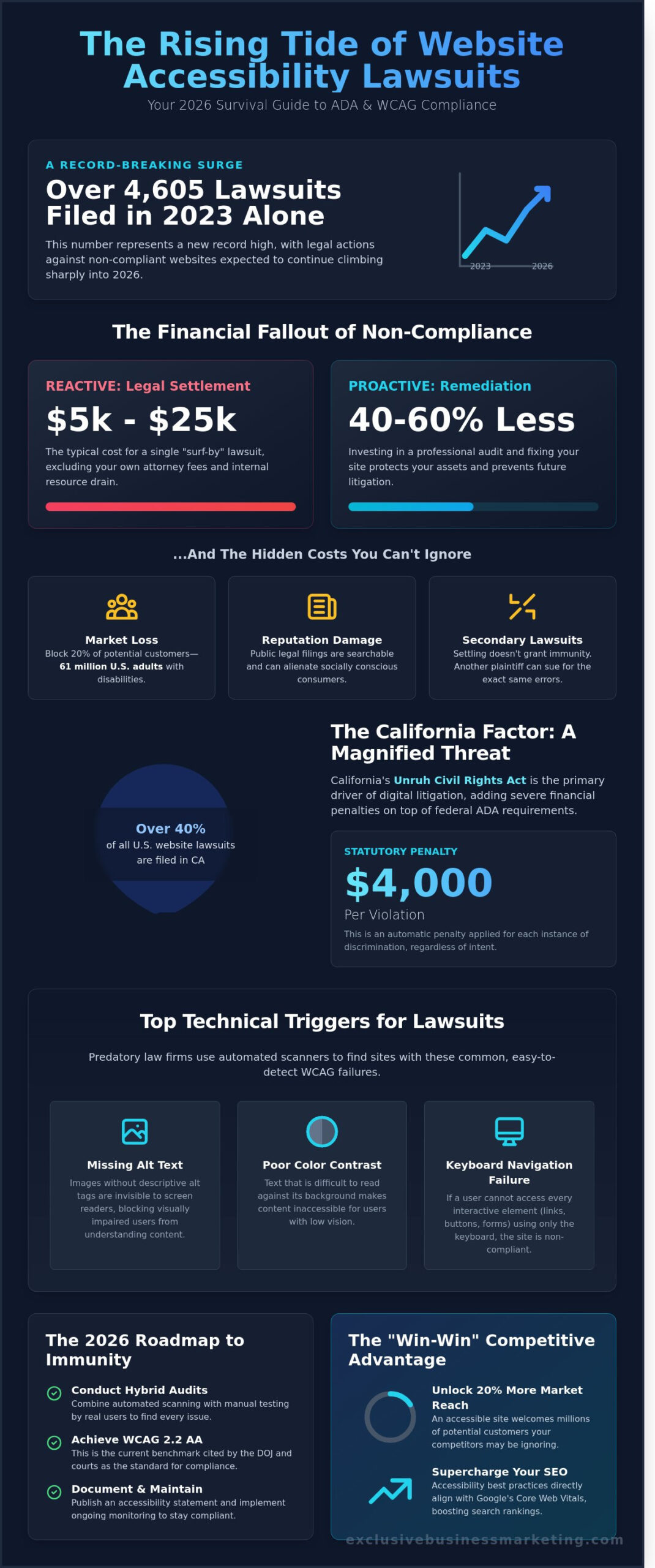
In 2023 alone, plaintiffs filed over 4,605 digital accessibility lawsuits in U.S. federal courts, marking a record high that continues to climb as we move into 2026. You’ve likely felt the growing pressure to secure your digital presence, yet the technical jargon of WCAG 2.2 and the potential cost of remediation can feel overwhelming. It’s frustrating to worry that a single “surf-by” visitor could lead to a $25,000 legal settlement because of a missing alt tag or poor color contrast. We’ve built this guide to show you exactly how to avoid website accessibility lawsuits by implementing a streamlined, results-oriented roadmap to full compliance. Our team understands you need more than just a list of rules; you need a clear action plan that protects your revenue and reputation. You’ll discover the specific steps to shield your business from predatory litigation while unlocking the 20% increase in market reach that comes with a truly inclusive site. Let’s turn your legal anxiety into a competitive advantage today.
In fact, leading creative agencies have found that accessibility requirements often lead to stronger, more elegant designs. Firms like Royalty Marketing have built their reputation on creating luxury brand experiences that are also inclusive, proving that compliance and high-end design go hand-in-hand.
Key Takeaways
- Understand the 2026 legal landscape of ADA Title III to protect your business from the rising surge of predatory “surf-by” litigation.
- Discover why California’s Unruh Act poses a unique financial threat and how to safeguard your brand from automatic statutory damages.
- Identify the common technical triggers lawyers use to screen sites and learn how to avoid website accessibility lawsuits by mastering the keyboard-only test.
- Implement our proactive 2026 roadmap to achieve digital immunity through hybrid audits and prioritized WCAG Level AA compliance.
- Unlock the SEO “win-win” by aligning accessibility standards with Google’s Core Web Vitals to boost your site’s crawlability and search rankings.
The State of Website Accessibility Lawsuits in 2026
The legal landscape for digital presence changed permanently on April 24, 2024, when the Department of Justice (DOJ) released its final rule regarding web accessibility. By 2026, these regulations have shifted from “best practices” to mandatory requirements for nearly every commercial entity in the United States. Understanding ADA Title III is the first step in learning how to avoid website accessibility lawsuits. This law requires “places of public accommodation” to be accessible to people with disabilities. While the law originally targeted physical buildings, federal courts now consistently rule that websites are digital extensions of those spaces. Serial plaintiffs use automated software to scan thousands of sites per day, looking for missing alt-text or poor color contrast. These “surf-by” lawsuits often target small businesses that don’t have a dedicated IT team to monitor compliance 24/7.
The technical bar has also moved significantly. While WCAG 2.1 was the industry standard for several years, 2026 marks the full adoption of WCAG 2.2 and the transition toward WCAG 3.0. These updates focus heavily on mobile accessibility and navigation for individuals with cognitive disabilities. If your site hasn’t undergone a professional audit since 2023, it’s likely failing at least 25% of the current criteria. A deep understanding web accessibility is no longer an optional perk for large corporations; it’s a core requirement for every business owner who wants to stay out of the courtroom.
What is a ‘Public Accommodation’ in the Digital Age?
Courts now define commercial websites as digital storefronts where the exchange of information, goods, or services occurs. This means a service-based business in Huntington Beach, such as a local consultancy or a medical clinic, is not exempt simply because they lack an e-commerce shopping cart. If a potential client can book a consultation, read a blog, or use a contact form, your site is a public accommodation. You must realize that “accessible” means a person can use the site, while “compliant” means you have the technical documentation to prove you meet every specific legal standard under the law.
The Cost of Non-Compliance: Beyond Attorney Fees
Ignoring these standards is a massive financial risk. Settling a single ADA lawsuit in 2026 typically costs between $5,000 and $25,000 in legal fees and plaintiff payouts. Proactive remediation usually costs 40% to 60% less than a legal settlement and provides long-term protection. Beyond the check you write to a lawyer, you face these hidden costs:
- Market Loss: You effectively block 61 million adults in the US who live with a disability, representing roughly 20% of your potential customer base.
- Reputation Damage: Public legal filings are searchable and can alienate socially conscious consumers.
- Secondary Lawsuits: Paying a settlement doesn’t grant immunity; if you don’t fix the underlying code, a second plaintiff can sue you for the same errors the following week.
We see businesses lose thousands of dollars because they waited for a demand letter instead of acting early. At Exclusive Business Marketing, we handle the technical heavy lifting so you don’t have to worry about legal predators. Our team ensures your site meets the latest WCAG standards, protecting your revenue and your reputation. Contact us today for a free quote and let us secure your digital presence. We are ready to help you navigate these changes and keep your business moving forward. Call us now to discuss how to avoid website accessibility lawsuits and protect your investment.
The California Factor: Navigating the Unruh Civil Rights Act
California is the undisputed epicenter of digital accessibility litigation in the United States. In 2024, California courts handled over 40% of all website accessibility lawsuits filed nationwide. This isn’t a coincidence. The primary driver is the Unruh Civil Rights Act, a state law that packs a much heavier punch than federal regulations. While the federal Americans with Disabilities Act (ADA) primarily seeks to force businesses to fix their sites, the Unruh Act allows plaintiffs to recover actual damages. Specifically, businesses face a statutory penalty of $4,000 per violation. This applies regardless of whether you intended to discriminate or even knew your site had issues. If a user with a visual impairment can’t complete a purchase on your site, you’re potentially on the hook for thousands of dollars before you even step into a courtroom.
The legal landscape is complex because it blends federal requirements with strict state penalties. While the DOJ provides official ADA web guidance to help businesses understand their obligations, California courts often interpret these rules with zero leniency. For many business owners, understanding how to avoid website accessibility lawsuits starts with recognizing that California doesn’t offer a “grace period” for compliance. One single barrier on your homepage is enough to trigger a demand letter. This high stakes environment has created a cottage industry for predatory law firms that use automated software to scan thousands of California-based websites every month. They aren’t looking for major civil rights violations. They’re looking for easy targets with minor coding errors.
Why California Businesses Face Higher Risks
California courts maintain a significantly lower bar for plaintiffs compared to other jurisdictions. In early 2025, several key rulings reinforced that a plaintiff doesn’t need to prove they were “denied” service. They only need to show they were “deterred” from using the site. This means a “one-size-fits-all” national strategy often fails in the Golden State. A site that passes a basic audit in Texas might still be considered non-compliant under the specific precedents set by the California 2nd District Court of Appeal. You need a strategy that accounts for these local legal nuances.
Protecting Your Huntington Beach Business
Orange County has become a specific hotspot for these filings. We’ve seen a surge in demand letters targeting local businesses in Huntington Beach, Irvine, and Newport Beach. Predatory firms often target local retailers and service providers because they assume smaller local brands lack the resources to fight back. If you receive a “Letter of Intent” from a law firm, don’t ignore it. These letters are often the precursor to a formal lawsuit. Your first step should be consulting with a local expert in ADA compliant website design who understands the exact triggers used by California plaintiffs.
We’ve helped numerous local companies navigate these threats by implementing proactive technical fixes. Relying on a generic plugin isn’t enough to protect you from a $4,000-per-violation penalty. You need a comprehensive audit that aligns with both WCAG 2.2 standards and California-specific case law. If you’re concerned about your current level of risk, you can contact our Huntington Beach team for a professional evaluation of your site’s accessibility status. Taking action now is the most effective way to ensure you know how to avoid website accessibility lawsuits before a process server arrives at your door.
Top 7 Technical Triggers for Accessibility Lawsuits
Plaintiff lawyers don’t spend hours manually auditing your code. They use automated scanning software like WAVE or Axe to find “low-hanging fruit” in under 30 seconds. In 2023, data from Seyfarth Shaw showed that 4,605 ADA Title III lawsuits were filed against website owners. These lawyers look for specific technical failures that prove a site is difficult for disabled users to navigate. Learning how to avoid website accessibility lawsuits starts with identifying these common triggers before a process server arrives at your door.
The most basic test is the keyboard-only check. If a user cannot navigate your entire site using only the Tab, Enter, and Arrow keys, your site is a high-priority target. This simple failure prevents users with motor impairments or vision loss from accessing your services. The Official DOJ Web Accessibility Guidance emphasizes that businesses must provide “effective communication” online, and a site that requires a mouse fails this standard immediately. Fix these errors now to protect your business and improve your user experience.
Navigation and Interactive Elements
Focus Order and “Skip Navigation” links are vital for screen reader users. If the focus highlight jumps from the header to the footer instead of following a logical path, the user becomes disoriented. You also need a “Skip to Content” link at the top of every page. This allows users to bypass 20 repetitive menu items to reach the main text. Without it, you’re forcing users to hit the Tab key dozens of times on every single page load. Contact us today for a free quote on a site audit.
Hover-only menus are another major litigation trap. If your sub-menus only appear when a mouse hovers over a link, they’re invisible to keyboard users and often break on touchscreens. Fix this by ensuring all menus open on a click or keypress. Inaccessible forms are even more dangerous. A missing label on a “Purchase” button is a $4,000 mistake under statutes like the California Unruh Act. If a screen reader can’t identify what a text box is for, the user cannot complete their transaction. We can help you fix these labels today.
Content and Media Barriers
Visual barriers are the easiest for automated bots to flag. For text to be readable by users with low vision, you must maintain a WCAG color contrast ratio of at least 4.5:1 for all standard text and interactive elements. If your light gray text sits on a white background, you’re essentially hiding information from a portion of your audience. Our team uses precise tools to ensure every hex code on your site meets these strict legal requirements.
The “Alt-Text” myth causes many business owners to fail audits. Simply having an alt attribute isn’t enough; it must be descriptive. Using “Image123.jpg” or “Stock-Photo-Home” is actually worse than having no alt-text at all because it forces the screen reader to read out useless file names. Finally, check your PDF documents. Over 90% of business brochures uploaded as PDFs are flat images that are completely invisible to the visually impaired. If your price list or service guide is a PDF, it must be tagged and remediated to ensure compliance and help you understand how to avoid website accessibility lawsuits effectively.
Contact us today for a free quote. We are ready and available now to help you secure your digital presence, remove these technical triggers, and drive more revenue through inclusive design.
The 2026 Roadmap to Website Immunity
Achieving total digital accessibility isn’t a one-time task; it’s a rigorous process of standardizing your site’s architecture. By 2026, the Department of Justice expects businesses to meet WCAG 2.1 Level AA standards. To stay ahead, you must follow a structured roadmap. The first step involves a hybrid audit. Software scanners are efficient, but they only catch about 30% of accessibility errors. Manual testing by experts using screen readers is the only way to identify the remaining 70% of issues, such as logical reading orders and complex keyboard navigation. This dual approach is the foundation for how to avoid website accessibility lawsuits effectively.
Once your audit is complete, prioritize your fixes. Level A violations are critical blockers that prevent users from navigating your site at all. Level AA violations are the legal benchmark for most current lawsuits. Address these first to build a defensive wall around your business. After remediation, you must publish an Accessibility Statement. This document serves as a public commitment to inclusion and provides a clear communication channel for users to report issues before they escalate into legal complaints. Finally, you need a protocol for continuous monitoring. Since 98.1% of homepages had detectable WCAG failures in 2023 according to WebAIM, staying compliant requires constant vigilance.
The Danger of ‘Quick Fix’ Overlays
Many business owners fall for the trap of accessibility overlays or AI widgets. These tools claim to fix your site with one line of code, but they often do the opposite. In 2023, more than 460 lawsuits were filed against companies that used these “quick fix” solutions. Overlays frequently conflict with assistive technologies like JAWS or NVDA, creating a frustrating experience for disabled users. They don’t fix the underlying source code, which means the legal risk remains. Manual remediation is the only path to genuine legal safety. It ensures your site is fundamentally inclusive rather than just wearing a digital mask.
Setting Up a Maintenance Schedule
A website that is 100% compliant on Monday can be non-compliant by Tuesday if a team member uploads a new blog post without alt-text. You must train your content team on basic WCAG standards like proper heading structures and descriptive link text. Regular check-ups are non-negotiable. Use our free ADA compliance checker as a starting point to baseline your current status. We recommend a full manual audit every six months and automated scans every month. This proactive rhythm ensures that small errors don’t snowball into expensive legal liabilities. Don’t wait for a demand letter to arrive in your inbox. Take control of your digital presence now.
Our team of certified professionals is ready to walk you through the entire remediation process. We handle the technical complexities so you can focus on running your business. Contact us today for a free quote to start your journey toward WCAG and ADA compliant website design.
The Win-Win: How Accessibility Supercharges Your SEO
Most business owners view digital compliance as a defensive move. They search for how to avoid website accessibility lawsuits to protect their assets, but they often miss the massive growth potential hidden in these regulations. Accessibility and Search Engine Optimization (SEO) are two sides of the same coin. When you build a site that’s easy for a person with a visual impairment to navigate, you’re simultaneously building a site that’s easy for Google’s bots to crawl and index. This alignment is not a coincidence. Google’s Core Web Vitals and the WCAG 2.1 standards both prioritize user experience, stability, and speed.
Search engines are essentially “blind” users. They don’t see your beautiful hero images or your sleek color palette; they read the underlying code to understand what your business offers. If a screen reader can’t make sense of your site, a search engine crawler will likely struggle too. By cleaning up your technical debt to meet ADA standards, you’re handing Google a clear map of your content. This leads to better rankings, more traffic, and a higher return on your digital investment.
Google Loves Accessible Sites
Proper heading structures are the backbone of both accessibility and SEO. Over 80 percent of screen reader users rely on H1 through H6 tags to navigate a page and find the information they need. Google uses these same headers to determine the hierarchy and relevance of your content. When you use semantic HTML correctly, you’re telling search engines exactly which topics are most important. This clarity helps you rank for the right keywords while ensuring your site remains compliant.
Alt-text for images is another critical overlap. Since roughly 20 percent of all Google searches happen on Google Images, missing alt-text means you’re ignoring a huge slice of potential traffic. Descriptive alt-text allows search engines to index your visuals and provides context for users who can’t see them. Furthermore, clean code leads to faster load times. A study by Portent showed that a site that loads in 1 second has a conversion rate 3 times higher than a site that takes 5 seconds. Accessible code is lean code, and lean code is fast.
The “Curb-Cut Effect” describes how features designed for people with disabilities end up benefiting everyone. Think of captions on a video. While they are essential for the deaf, they also help a potential customer watching your content in a noisy office or a quiet library. This inclusivity keeps users on your site longer. High dwell times and low bounce rates are powerful signals to Google that your site is valuable. When users find your site easy to use, they stay. When they stay, your rankings climb.
Your Next Steps for a Worry-Free 2026
The urgency to act has never been higher. In 2023, plaintiffs filed 4,605 ADA-related digital lawsuits, which represents a 14 percent increase from the previous year. As we head toward 2026, the legal landscape is only getting tighter. Learning how to avoid website accessibility lawsuits is the first step, but implementation is where most businesses stumble. You don’t have to choose between a beautiful site and a compliant one. You can have both.
Exclusive Business Marketing acts as your shield and your growth partner. We handle the complex technical audits, the ARIA labeling, and the semantic code adjustments so you can focus on running your business. We are a one-stop shop for all your digital needs, ensuring your marketing is as inclusive as it is effective. Don’t wait for a demand letter to arrive in the mail. Contact us today for a free quote and let’s make your website a high-performing, accessible asset that drives revenue 24/7.
Secure Your Digital Future and Lead the 2026 Market
Waiting until a legal demand letter arrives is a gamble that costs California businesses thousands under the Unruh Civil Rights Act. You’ve seen the 7 technical triggers that put your site at risk. You also know that WCAG 2.2 standards aren’t just about legal safety. They drive a 110 percent increase in search visibility when handled correctly. Mastering how to avoid website accessibility lawsuits requires a proactive 2026 roadmap that combines technical precision with constant vigilance.
Exclusive Business Marketing stands as Orange County’s leading SEO and compliance agency. We provide expert WCAG and ADA compliant design backed by 24/7 support and proactive monitoring. Don’t leave your revenue to chance when you can secure your site today. Our team walks you through every step to ensure your digital presence is both inclusive and profitable.
Protect your business today; get your Free ADA Compliance Audit here!
It’s time to turn compliance into your competitive advantage and build a site that serves everyone.
Frequently Asked Questions
Is my small business website really required to be ADA compliant?
Yes, your small business website must be ADA compliant because the Department of Justice classifies websites as places of public accommodation under Title III. In 2023, 82% of accessibility lawsuits targeted businesses with under $50 million in annual revenue. Ignoring these standards leaves you vulnerable to predatory litigation and lost sales. We help you implement these changes so you have less to worry about. Contact us today for a free quote.
What is the difference between WCAG 2.1 and WCAG 2.2?
WCAG 2.2 builds on the 2.1 standards by adding 9 new success criteria designed to improve navigation for users with cognitive disabilities and low vision. These updates, finalized in October 2023, include requirements like minimum target sizes for buttons to help users with motor impairments. Staying current with WCAG 2.2 is a critical step in learning how to avoid website accessibility lawsuits. Our certified professionals handle these technical updates for you.
Can I just use an accessibility plugin or overlay to avoid lawsuits?
No, accessibility overlays and plugins don’t provide full legal protection and often fail to fix underlying code issues. A 2023 report from UsableNet found that 933 lawsuits were filed against companies using these automated tools. These quick fixes can actually interfere with screen readers, making the site harder to navigate for disabled users. We provide custom, manual fixes that ensure real compliance. Contact us today for a free quote.
How much does a website accessibility audit cost in 2026?
In 2026, a professional manual accessibility audit typically ranges from $2,500 for basic sites to $15,000 for complex e-commerce platforms. This investment covers thorough testing by human experts who identify issues that automated software misses. While cheaper tools exist, they only catch 30% of potential errors. Investing in a high quality audit is the most effective way to protect your revenue. Call us now at 1-866-WEB-MKTG to start.
How long do I have to fix my site if I receive a demand letter?
Most demand letters require a response within 21 days and expect a remediation plan to be active immediately. Delaying your response can lead to a formal filing in federal court where settlements average $20,000 per instance. You should contact an attorney and an accessibility expert the same day you receive a notice. We’re ready and available now to help you address these urgent threats. Contact us today for a free quote.
Does ADA compliance affect my website’s design or aesthetic?
ADA compliance enhances your design by emphasizing clarity, though it does require specific color contrast ratios of at least 4.5:1 for standard text. These requirements don’t ruin your aesthetic; they make your brand more accessible to the 61 million adults in the US living with a disability. Good design is inclusive design. Our team creates cutting edge sites that look awesome while meeting every legal standard. We’ll prove it to you.
What is an Accessibility Statement and do I need one?
An Accessibility Statement is a public declaration on your site that outlines your commitment to inclusion and provides contact information for reporting barriers. Having this document is a vital component of how to avoid website accessibility lawsuits because it demonstrates a good faith effort to comply. It should list the specific WCAG version you’re targeting. Contact us today for a free quote on drafting your statement and securing your site.
How often should I test my website for accessibility issues?
You should perform automated scans monthly and conduct a full manual audit every 6 months or after any major site update. Web content is dynamic, and new blog posts or product listings can introduce errors that break compliance instantly. Regular testing ensures you maintain a 100% accessible experience for every visitor. We provide ongoing monitoring services to keep your business safe 365 days a year. Call us now to schedule your first test.